
Searching for the best 3D printer can feel overwhelming, but your hunt officially ends here. We know you’re tired of confusing specs and just want a machine that brings your creative ideas to life. Our team has rigorously tested the top models to reveal the absolute champions in 3D printing for every budget. Get ready to transform your digital designs into stunning physical objects.
Contents
- Top 5 3D Printer:
- 1. Bambu Lab A1 3D Printer
- 2. FLASHFORGE AD5X Multi-Color 3D Printer
- 3. ELEGOO Centauri Carbon 3D Printer
- 4. Creality K1 SE 3D Printer
- 5. FLASHFORGE Adventurer 5M 3D Printer
- Things to Consider Before Buying a 3D Printer:
- FDM Printers
- SLA Printers
- SLS Printers
- Print Volume
- Material Compatibility
- Print Quality
- Researching Brands
- Making the Purchase
- Routine Care
- Troubleshooting
- To wrap up
Top 5 3D Printer:
1. Bambu Lab A1 3D Printer

If you’re looking for a desktop 3D printer that moves with speed but doesn’t sacrifice print quality, check out the Bambu Lab A1. Maximum acceleration of up to 10,000 mm/s² maintains movement sharp and cycle times quick for finite prototypes, vivid iterations and definitive use-part production. It works on a laptop, desktop, or smartphone and plays well with Linux for easy-to-use, scriptable workflows.
AMS lite supported makes multi-color printing easy. Pick A1 Combo, or add ams lite any time: line up multiple filaments for logos, labels, useful color-coding, and impressive models—with no switching during your prints.
Set up is a dream, since full-auto calibration makes it refreshingly hands off. The A1 does Z-offset, mesh bed leveling, and other tuning automatically! Reliable first layers reduce failed prints; take your perfect part from the bed to your workspace more quickly. In the same way that sending a video with 4k resolution requires more bandwidth than an SD video, a part’s X-Y quality is directly related to design details and infill density), Active Flow Rate Compensation provides seamless, high-quality prints by adjusting the flow rate of your print in real time.
And there’s day-to-day predictability you’ll love: faster turnarounds, fewer failed starts, and footage that can look great out of the camera without much post processing. Whether it’s a bracket, the next cosplay part, or your classroom projects, they get you from design to functional print in the time it takes other machines to make youre machine work instead of your focus staying on DESIGN & FUNCTION.
If you want pro-level output, this is the one to get.“ – All3DP“All3Dp.com The Voxel is a unique, easy to use, beginner-friendly 3D printer that brings 3D printing to the masses with its simple menu system displayed on a 2.8″ color IPS touch screen.
2. FLASHFORGE AD5X Multi-Color 3D Printer
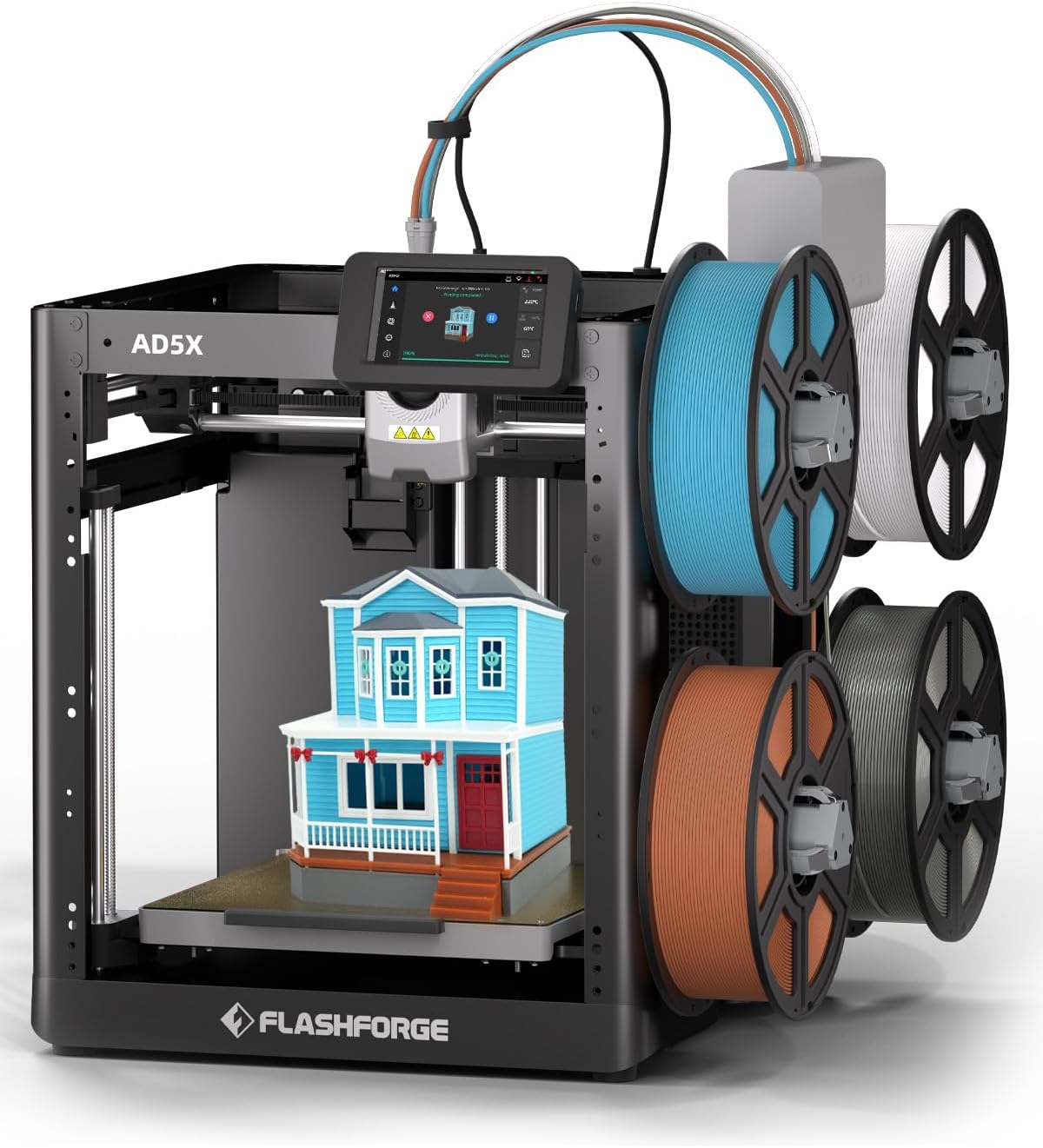
If you’re looking for speed, trust-worthy multi-colored prints without fiddling with Chinese settings all day long, the FLASHFORGE AD5X keeps your brain untroubled. Its advanced system can apply as many as four colors at a time for logos, labels, gradients and visual highlights in a single job — perfect for artists, designers and makers seeking standout results with less post-work.
Thanks to the Intelligent Filament System (IFS), you spend more time printing and less time babysitting. It checks filament continually auto-recognizes runout, and resumes anywhere necessary to reduce downtime. That will result in cleaner timelines, less failed prints and better productivity for your day.
Speed is a strong suit, with a speed of up to 600 mm/s and acceleration of 20,000 mm/s² to let you turn out fast designs while delivering crisp detail. Under the hood, an all-metal CoreXY motion system delivers smooth and even travel for quality prints, while minimizing backlash to make lines and dimensions sharper—even on more complicated parts.
Versatility is baked in. The AD5X processes stiff TPU as well as standard materials, allowing you to prototype living hinges and gaskets, and soft-touch features next to parts with decorative surfaces. With a build volume of 220 × 220 × 220 mm you have plenty of space for large models or economical multi-part prints.
If your workflow relies on color and you need speed and consistency, this printer gets you from concept design to finished part with less hassle — meaning more time going into the quality of the design, less tuning.
3. ELEGOO Centauri Carbon 3D Printer

If you are in need of a quick, efficient 3D printer that will meet you where you’re at and have you leveled up as soon as possible, the ELEGOO Centauri Carbon is the answer. You will unbox a ready to work machine with its first calibration pre-calibrated that you can use right away — there’s no set up or assembly, just decide on your material and print. Additive Manufacturing With a 10” Cubed Build Volume provides space for functional parts and prototypes of nearly any size.
You don’t have 8 days, however, and that is where time from thought to object becomes important.The CoreXY motion system does it with print speeds up to 500 mm/s and acceleration up to 20,000 mm/s². A high-flow hotend and heated bed combo will keep the wost warp, so big models finish more reliably–and look., well huge.done.
A 320°C brass-hardened steel nozzle, an enclosed chamber, and higher cooling ensure the Temper can handle more exotic filaments like carbon-fiber-reinforced materials for super-strong, lightweight heat-resistant parts: perfect for drones, automotive brackets and athletic gear.
You also want reliability. The solid die-cast aluminum base adds stability while limiting vibration and ultimately enhances print quality at high speeds, also featuring adjustable automatic leveling to compensate for variations in build platform level.
You’ve got the juice, no matter where you are. Built-in chamber camera and dual LED illumination enable you to see the progress, easily take time-lapse videos, and make adjustments from anywhere with confidence.
If you want a printer that is easy to launch, grows with your abilities and continually delivers quality at real speed, then Centauri Carbon is ready on day one – for what’s next.
4. Creality K1 SE 3D Printer

If you’re eyeing a tiny, rapid little CoreXY that won’t skimp on quality, the K1 SE was made for you. You’ll go from concept to part faster than ever with a fully enclosed 3D printing system that has windows, HEPA filter, wifi and more, all while enabling print speeds up to 20,000 mm/s².
What you do get from the K1C is Creality’s premium extruder, which has been improved with a side spring and ball plunger for accurate feeding without slippage. That translates to cleaner surfaces for PLA and PETG, as well as confident flexible TPU printing. A run out sensor monitors material use, and warns you before a job runs out allowing jobs to be paused and waste to be salvaged.
You’re also set for the hotter, harsher materials. Tri-metal nozzle (steel, copper, titanium alloy) with precise forces on the filament and a balanced heat dissipation across both the hot block and heatsink. With its 60 W hotend and ceramic heater it can hit 300 °C in under 75 seconds to have you up and running blazing fast for all of those prints where speed is a priority.
You can force speed because the chassis will accept it. Die-cast aluminum components, corner gussets and two side crossbeams stiffen the frame to suppress vibration and maintain layering accuracy.
You also eliminate fiddly setup. Featuring one-click auto calibration and Z-offset, you only need to tap once on the screen and have your first layers ready in minutes. The K1 SE has a place on your bench if you like speed, efficient feeding and almost hands-off setup in an under-your-desk small CoreXY.
5. FLASHFORGE Adventurer 5M 3D Printer
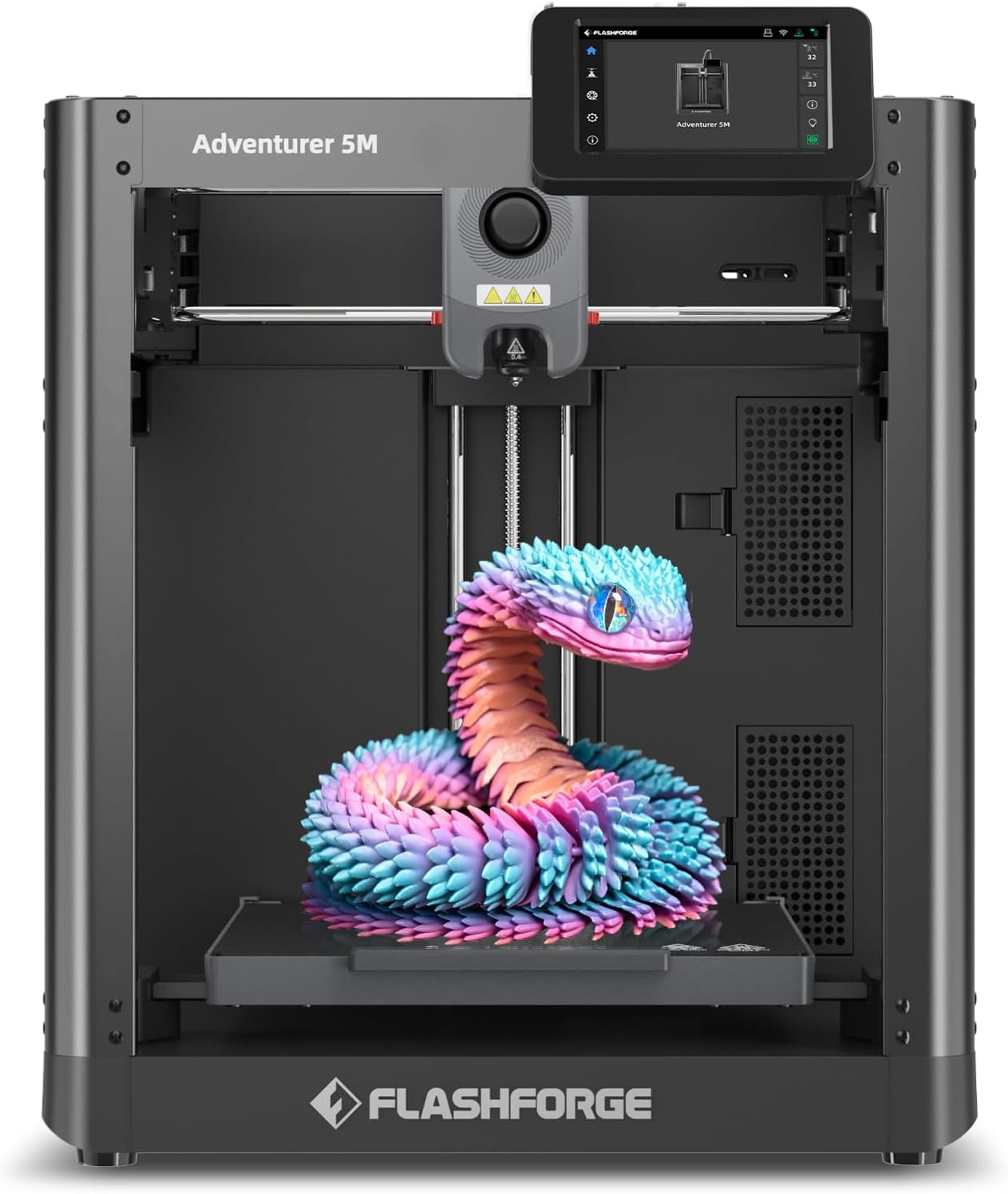
High speed without the struggle,keep printing more and troubleshooting less with FLASHFORGE Adventurer 5M. You tap, it beeps, you wait 11 seconds from first push to print Perfectly level bed enables higher quality printing No need for leveling or using paper and glue stick on your hotbed Includes magnets (Already attached to the FlexPlate) 4 High Temp Resistant sticky strips included; use on an unlimited number of printers Too many printers have warped, uneven build plates.
You also get real throughput. CoreXY motion system supports up to 600 mm/s speeds and 20,000 mm/s² acceleration for fast prototypes and production parts while keeping fine details sharp. High flow 32 mm³/s nozzle and a speedy 35-second heat-up to 200 °C gets your printing started in no time.
And you’re set up for quick turnarounds, as well. Change nozzles in less than 3 seconds, and take your nozzle anywhere from between its minimum restriction to the max.Simply pop the finished part off of the PEI build surface with zero hassle. The 280 °C extruder and 100 °C chamber offer a wide range of filaments and a fast set-up process for faster print results, as well as great wall quality.
You will notice the quality immediately. Dual-fan nozzles enhance cooling on features and overhangs; Vibration compensation improves print quality for high-speed prototyping. Remote control tools allow you to monitor progress and intervene when necessary.
If you appreciate one-step setup, genuine speed and versatile high-quality output featured in a smart but practical package, then the Adventurer 5M is on hand to put your workflow into overdrive, right from day one.
Things to Consider Before Buying a 3D Printer:
Before purchasing a 3D printer you should evaluate your intended use, desired print quality, material compatibility, build volume, speed, reliability, and maintenance costs. Consider your budget, workspace, required software skills, safety and ventilation needs, and spare parts availability. Compare open vs closed systems, community support, and warranty to ensure the printer matches your workflow and long-term goals.
FDM Printers
You’ll use fused deposition modeling to extrude thermoplastics like PLA, ABS, and TPU with layer heights typically 0.05–0.30 mm (50–300 µm); desktop units range from about, and large-format machines can reach 500×500×500 mm build volumes. FDM suits functional prototypes and fixtures, but you must manage anisotropic strength, visible layer lines, and print orientation to meet mechanical requirements.
SLA Printers
Resin-based SLA gives you fine detail and smooth surfaces with layer heights often between 0.025–0.10 mm (25–100 µm); desktop models cost roughly $300–$6,000. You’ll use SLA for dental, jewelry, and high-detail prototypes, and should plan for wash, UV cure, and safe resin handling as part of the workflow.
Dental labs and jewelers often choose SLA machines like the Formlabs Form 3 to produce surgical guides and master patterns at 25 µm resolution using biocompatible and castable resins; note resin prices commonly run $50–$200 per liter and parts can be brittle unless you select engineering-grade formulations.
SLS Printers
Selective laser sintering fuses nylon powder (commonly PA12), producing strong, nearly isotropic parts without support structures; typical feature resolution sits around 60–200 µm. Industrial SLS systems start above, so you’ll often rely on service bureaus for low-volume runs; the process excels for durable functional components and complex assemblies.
Aerospace and automotive suppliers use SLS (vendors like EOS, HP) for end-use brackets and functional prototypes because parts offer repeatable mechanical properties and good heat resistance; expect post-processing steps such as depowdering and bead blasting and higher per-part costs due to material and machine overhead.
Print Volume
You should match build volume to the largest parts you plan to print: common FDM beds are 220×220×250 mm (Ender 3 family) or 250×210×210 mm (Prusa MK3S), while large-format units exceed 400×400×400 mm. Think about part orientation and whether you can split models into assemblies; for fine miniatures under ~100 mm, a resin printer with a 120×68×155 mm vat often yields better detail and surface finish.
Material Compatibility
You need to check which filaments or resins a printer supports: PLA (190–220°C) and PETG (220–250°C) cover most projects, ABS and PC require higher temps and an enclosure (ABS ~230–250°C, PC ~260–310°C), and Nylon often needs 240–270°C plus drying. Flexible TPU benefits from a direct-drive extruder, while abrasive composites (carbon/metal-filled) require hardened steel nozzles to avoid wear.
Also verify filament diameter (1.75 mm vs 2.85 mm), hotend type (all‑metal for >250°C vs PTFE-lined for lower temps), and spool mounting. You should plan for filament storage—dry boxes or desiccants—since Nylon and PETG absorb moisture. For SLA/DLP, check resin types (standard, engineering, flexible) and post‑processing needs: washing and UV curing, plus ventilation and PPE requirements.
Print Quality
You can expect typical consumer FDM quality around 0.1–0.3 mm layer heights with a 0.4 mm nozzle, and dimensional tolerances often within ±0.1–0.2 mm after tuning. Motion system matters: rigid Cartesian frames give stable accuracy, CoreXY enables higher speeds with similar accuracy, and Delta excels at tall, fast prints. Surface finish also depends on cooling, nozzle diameter, and slicing strategy.
To improve quality, calibrate bed leveling, E‑steps, and extrusion multiplier, and optimize slicer settings like retraction, print speed (40–80 mm/s for PLA), acceleration, and cooling fan profiles. Use test prints—calibration cubes, retraction towers, and Benchy—to quantify changes with calipers; dialing layer height to 0.1 mm with a 0.4 mm nozzle increases detail but lengthens print time significantly.
Researching Brands
Start by comparing real-world reviews, warranty terms, and support responsiveness; for example, Prusa is praised for out‑of‑box reliability, Creality for modifiability, and Formlabs for professional resin work. You should check whether firmware is regularly updated and if the manufacturer supplies spare parts.
Dive into community resources: scan forums, Reddit threads, and YouTube test prints to spot common failure modes and upgrade paths. Look for documented case studies—schools often choose Prusa for reliability, maker spaces favor Creality for cost-effective fleet scaling—and verify local service centers or parts distributors to shorten downtime if you need repairs.
Making the Purchase
Before you buy, verify warranty length (commonly 1 year), return policy, and spare-parts lead time; compare reseller vs direct pricing including shipping and taxes. Ensure filament/resin availability in your region, and check whether bundles include tools, build-surface options, or filament samples that reduce initial setup cost and downtime.
After purchase, plan an initial test protocol: print calibration cubes, overhang tests, and temperature towers to establish baseline slicer profiles. Keep an inventory of consumables—nozzle sizes (0.2–0.6 mm), spare PTFE tubes, and a replacement hotend—so you can swap parts quickly. If you rely on uptime for client work, consider a service contract or a local reseller that stocks critical spares.
Routine Care
Perform a cold-pull or nozzle clean every ~50 print hours or when under-extrusion appears, and wipe the build surface with 70% isopropyl before each job. Lubricate linear rods/lead screws every 50–100 hours with light synthetic oil, check belt tension and pulley grub screws after ~10 prints, and replace PTFE tubing every 6 months or ~200 hours if printing at high temperatures. Keep spare 0.4 mm nozzles and a compact toolkit.
Troubleshooting
When defects appear, run targeted checks: measure filament diameter to ±0.02 mm, print a 20 mm calibration cube, and command a 100 mm extrusion to verify E-steps. Try +/-5°C nozzle adjustments, reduce retraction by 0.5–1 mm for stringing, or tighten belts for layer shifts. Note common retraction starting points—direct drive 0.5–1.5 mm, Bowden 2–6 mm at 20–40 mm/s.
For deeper diagnostics, perform a cold pull with cleaning filament or nylon (heat to printing temp, pull when cool to ~90°C), remove and inspect the nozzle for wear from abrasive filaments, and run PID autotune (e.g., M303) for stable temps. Calibrate E-steps by marking filament, commanding 100 mm extrusion, measuring actual extrusion, adjusting M92, then saving with M500; check M503 to review settings. If persistent, capture log files and photos for vendor or forum escalation.
To wrap up
On the whole, weigh your budget against intended use, print volume and resolution needs, material compatibility, and reliability; evaluate software, ease of maintenance, safety features, community support and available upgrades, and factor in operating costs and warranty terms so you choose a machine that matches your workflow and long-term goals.
Leave a Reply