
Finding the best AI home security camera is a smart way to keep your family safe. Stop worrying about false alarms and use smart detection that knows a person from a pet. With advanced facial recognition, you can finally reclaim your peace of mind and protect your sanctuary. We tested the top models to help you find the perfect fit. Let’s dive into our top picks.
Contents
- Top 7 AI Home Security Camera:
- 7: Tapo C220
- 6: Tapo C520WS
- 5: Ring Outdoor Cam Plus Battery
- 4: Tapo MagCam C460 KIT
- 3: Arlo Pro 6
- 2: eufy SoloCam S340
- 1: eufy eufyCam S4
- Things to Consider Before Buying a AI Home Security Camera:
- Wired vs. Wireless Intelligent Systems
- Indoor, Outdoor, and Video Doorbell Variations
- Image Resolution and Low-Light Capabilities
- Accuracy of Object and Facial Recognition
- Benefits of Automated Alerts and Remote Monitoring
- Limitations Regarding Privacy and Subscription Costs
- Identifying Optimal Camera Placement and Coverage
- Evaluating Connectivity and Storage Requirements
- Managing Data Privacy and Encryption Settings
- Maximizing Battery Life and Network Bandwidth
- To wrap up
Top 7 AI Home Security Camera:
7: Tapo C220

For those on a tight budget who still want an AI interior camera, we recommend the Tapo C220.As you go about your day at the office, your dog rips up the couch. You can get the inside look you want without breaking the bank. The C220 comes through.The first is a 2K ultra-high-definition camera system that automatically tracks motion as it moves about the room.What comes next is a system that can recognize when a person or infant is crying—not every shadow, but only when it matters.
Last but not least: SD card storage without a subscription—recordings are saved locally, and there is no monthly price.Negative: it is not waterproof for use outside; it is only suitable for use indoors. A featherweight plastic construction. Supports only Wi-Fi, no Ethernet available.Our top pick for first-time camera buyers, new parents, and pet owners. Use just inside the house; not suitable for use outside.
6: Tapo C520WS

One of the greatest affordable outdoor AI pan/tilt cameras for homeowners who want to keep an eye on a larger yard is the Tapo C520WS.Low-budget fixed-view cameras are missing 50% of the action. All it takes is a small step to the side, and that person is gone. That is resolved by the C520WS.To begin, a single installation of a 2K QHD camera with full-circle pan and tilt capability will cover the whole yard.The next feature is a built-in AI system that can recognize people and vehicles without charging a monthly fee.
At last, it’s IP66 certified, meaning it can withstand rain, snow, and even overnight stakeouts. It also has color night vision.Downside: you can’t use batteries; you have to plug it in. It tracks with a gentle buzz of the motor. It is essential to have Wi-Fi at the installation site.The ideal choice for those who need affordable, extensive coverage, such as yard watchers or driveway monitors. Not suitable for: spaces without access to electricity or those using solely batteries.
5: Ring Outdoor Cam Plus Battery

Renters should get the Ring Outdoor Cam Plus Battery, the greatest portable AI cam that runs on batteries.An outdoor AI camera will often require a hardwire kit. That is completely ignored by the Outdoor Cam Plus.To begin, there is color night vision and 2K HDR, which is precise enough to discern license plates and faces even in the dark.After that, the Ring app has customized artificial intelligence motion zones; for example, you may draw a box around your driveway and have the app not detect any motion on the sidewalk.
Hang it on a fence, a railing, or a balcony post; the rechargeable battery is weatherproof. Keep it until next month.One drawback is that complete AI functionality requires a Ring Protect subscription. Compared to its wired rivals, the plastic construction feels flimsier. Initial setup does not include solar charging.Ideal for: those living in apartments, renters, and camera operators. Do not purchase if your home already has a wired Ring system.
4: Tapo MagCam C460 KIT

The top 4K AI home security camera from Tapo, the MagCam C460 KIT, and it doesn’t even need a subscription.A monthly subscription unlocks the genuine smarts on most consumer AI cams. Well, the C460 put a stop to that.The first is a 4K resolution that doesn’t require a cloud trip and comes with free on-device car and human identification. Local processing is handled by the camera.After that, there’s the magnetic mount with the built-in solar panel. Just attach it to any metal surface and let the sun charge it.
Lastly, footage remains on your microSD card—subscription-free local SD storage. Automatic privacy protections.Downside: Buy the microSD card separately; it’s not part of the package. Magnetic mounts require metal or the accompanying plate. Compared to more expensive products, the Tapo app has a sloppy feel.Ideal for: savvy consumers seeking 4K, homeowners concerned about privacy, and those who dislike subscription services. Avoid if you’re looking for an elegant app or one that integrates with Ring or Arlo.
3: Arlo Pro 6

If you are a homeowner looking for an outside camera with intelligence rather than simply video capabilities, consider the Arlo Pro 6.Forty motion notifications from the day before are scrolled through. Even the majority were insignificant. Updated with AI that summarises occurrences, the Pro 6 resolves this issue.To start, with AI Event Captions, each video is automatically annotated with a descriptive text, such as “person walking dog” or “delivery van arriving.” Quickly ascertain.
Following that, there will be 2K HDR, 12x digital zoom, and a 160° field of view, which is more coverage than any ordinary outdoor cam.Zoom-in details will be provided later.Lastly, the camera has built-in spotlight and color night vision; it detects activity automatically and turns on the light. We can still see faces.Requires an Arlo Secure membership to use Event Captions, which is a downside. Only supports single-cam setups. Under heavy use, the battery needs to be recharged every few weeks.Ideal for: homeowners willing to shell out cash for time-saving warnings. Avoid if you’re on a tight budget or if you’re a subscriber purist.
2: eufy SoloCam S340

For homeowners who are sick of paying monthly fees, the finest AI camera is the eufy SoloCam S340.Annual subscription fees add up quickly. If you cancel, your footage will disappear. Here, the SoloCam S340 ends the pattern.You have one camera that can do the work of two with its 3K dual-lens and 360-degree pan and tilt. Continue along the driveway’s edge without changing feeds.After that, the camera itself does the analysis for people, vehicles, and motion as part of its on-device AI detection system. Streamlined billing with no cloud trips.
Lastly, an embedded solar panel with 8 GB of storage—just place it on a sunny wall and it will automatically charge itself.Downside: Under heavy use, 8GB fills up quickly—a microSD card is a good idea. Not even Arlo can edit clips like the Eufy app can. Firmware upgrades are slower compared to well-known manufacturers.Great for: homeowners with a long-term vision, those who despise fees, and those who prefer to live off the grid. Reserved for: users of managed cloud services.
1: eufy eufyCam S4
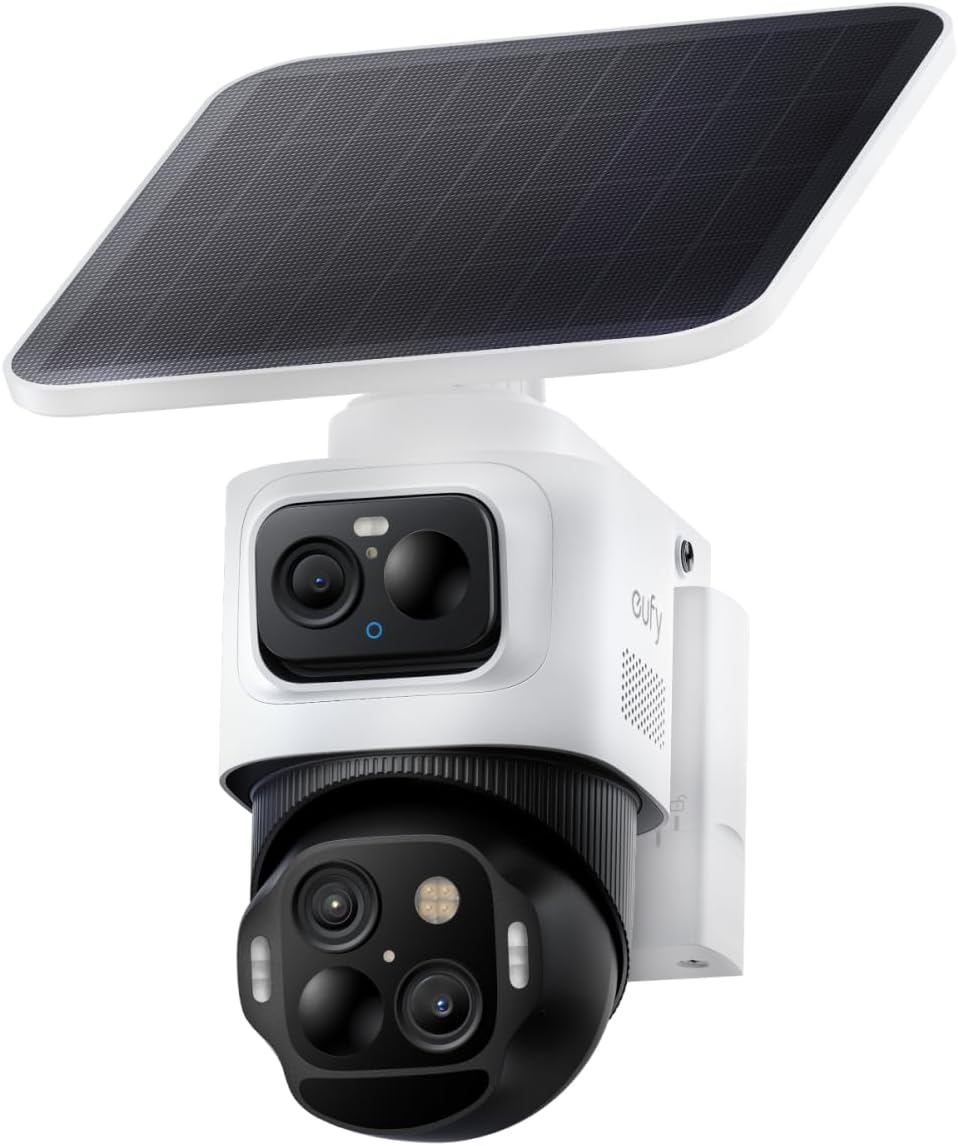
If you’re a homeowner who refuses to settle for a security system with blind spots, then you need the cutting-edge eufy eufyCam S4, the greatest artificial intelligence home security camera on the market.One angle is seen by standard cameras. Unidentified figures walk behind a car, then vanish and resurface. That is structurally impossible with the S4.One option is a triple-lens bullet plus PTZ design, which combines a wide-angle bullet camera with a motorized pan-tilt-zoom lens all in one unit. See far and close both at once.
The following feature is 8X optical zoom with AI subject tracking, where the PTZ lens detects a person and follows them automatically. A broad perspective is maintained by the bullet.The long-awaited off-grid AI security system has arrived: solar power, 32 GB of local storage, and no monthly costs.Downside: that’s not the easiest choice for eufy’s official product. Housing that is bulkier has to be planned. Setting up an app requires some practice.Who it’s best for: huge property owners, serious homeowners, and those who refuse to have coverage gaps. This product is not recommended for individuals who are new to purchasing cameras.
Things to Consider Before Buying a AI Home Security Camera:
Different types of AI security cameras cater to various needs. Selecting the right type involves considering the technology, placement, and additional features such as night vision or motion detection. Here’s a basic overview.
Wired vs. Wireless Intelligent Systems
Wired systems provide stable connections and better quality but require installation. Wireless systems offer flexibility and ease of placement, as they don’t depend on physical connections. Choosing between them depends on your specific needs regarding installation and indoor/outdoor usage.
Indoor, Outdoor, and Video Doorbell Variations
Indoor, outdoor, and video doorbell cameras differ primarily in their intended environments and functionalities. Indoor cameras monitor activities within your home, while outdoor models withstand weather conditions for exterior monitoring. Video doorbells enhance security at your entry point, offering both alerts and video feeds.
Understanding these variations allows you to select cameras that match your security needs. Indoor cameras often focus on movement detection in common areas, while outdoor versions typically offer night vision and durability. Video doorbells provide an interactive approach, allowing you to communicate with visitors while monitoring delivery or potential threats. Each type serves distinct purposes, enhancing overall home security.
Image Resolution and Low-Light Capabilities
Image resolution significantly impacts your camera’s clarity, especially during crucial moments. High-definition cameras provide detailed visuals, while low-light capabilities ensure effectiveness in dim conditions. Opt for models that excel in both areas to enhance your security.
Accuracy of Object and Facial Recognition
Object and facial recognition accuracy determines the reliability of alerts and notifications. Systems with advanced algorithms reduce false positives, allowing you to trust the information provided.
Accurately identifying objects and faces enhances your peace of mind. High-performing cameras use sophisticated technology to differentiate between people, pets, and inanimate objects. This capability minimizes unnecessary alerts, ensuring that only genuine threats are flagged for your attention. Prioritize systems boasting strong recognition capabilities to maintain an effective security network.
Benefits of Automated Alerts and Remote Monitoring
Automated alerts and remote monitoring provide peace of mind by notifying you instantly about any unusual activity. Accessing your camera feed from anywhere allows you to stay connected to your home, ensuring timely responses in case of emergencies.
Limitations Regarding Privacy and Subscription Costs
Privacy concerns arise when cameras record constantly, potentially invading personal spaces. Subscription costs add to the overall expenditure, making it imperative to evaluate the balance between functionality and affordability.
Expanding on privacy and costs, many users worry about data security, as stored footage can become vulnerable to breaches. Frequent subscription fees also increase over time, especially for advanced features, prompting a careful assessment of ongoing expenses against the benefits received.
Identifying Optimal Camera Placement and Coverage
Optimal placement enhances security. Determine high-risk areas, such as entrances or driveways, and ensure cameras provide overlapping views to minimize blind spots. Assess both indoor and outdoor locations, factoring in potential obstructions like trees or walls.
Evaluating Connectivity and Storage Requirements
Connectivity options affect camera functionality. Determine whether Wi-Fi or wired connections suit your environment better. Storage capabilities are equally important; consider how you’ll store video footage, whether through cloud services or local devices.
Evaluating connectivity and storage is crucial for a functional home security setup. Wi-Fi-connected cameras offer flexibility but require a strong network. In the context of storage, cloud solutions can provide off-site safety, while local storage may grant immediate access. Balance these factors with your budget and personal preferences to select the best option for your needs.
Managing Data Privacy and Encryption Settings
Prioritize data privacy by understanding the encryption settings of your security camera. Adjusting these settings can hinder unauthorized access, ensuring that your video footage remains confidential and secure. Make sure to review manufacturer guidelines for optimal configuration to safeguard your personal information.
Maximizing Battery Life and Network Bandwidth
Seek methods to extend battery life and reduce network strain. Avoid using multiple high-resolution features simultaneously, as this can deplete battery resources quickly. Regularly inspect your Wi-Fi connection for speed and reliability, optimizing settings based on your usage patterns.
Consider lowering video resolution or using motion-activated recording to conserve battery life and bandwidth. Adjusting these settings can significantly enhance your camera’s efficiency, extending its usable life without compromising your home’s security. Regularly monitoring your network’s performance will allow you to make necessary adjustments based on device demands and overall household usage.
To wrap up
To wrap up, consider your specific needs, budget, and the camera’s features before buying an AI home security camera. Evaluate factors like resolution, storage options, and connectivity. Research user reviews and ensure compatibility with your existing smart home systems to make an informed decision that enhances your home security effectively.
Leave a Reply