
Best Android Auto Head Units deliver seamless smartphone integration, and we’ve tested top Android Auto receivers so you don’t waste time on confusing car stereos. If you’re frustrated with lagging navigation or poor sound, this guide highlights reliable, easy-to-install options that boost safety and enjoyment. You’ll love these game-changing upgrades that make drives calmer and more fun. Read on to find the right model for your ride.
Contents
- Top 7 Android Auto Head Units:
- 7: ATOTO A5L 7inch Double DIN Car Stereo
- 6: Pioneer DMH-1600NEX 6.8″ Double Din Car Stereo
- 5: Alpine iLX-W670 Digital Multimedia Receiver
- 4: Pioneer DMH-W3050NEX 6.8″ Double Din Car Stereo
- 3: Sony XAV-AX4000 7-Inch Multimedia Receiver
- 2: Sony XAV-AX6000 7-Inch Multimedia Receiver
- 1: Pioneer DMH-WT3800NEX 9″ Floating Display Car Stereo
- Things to Consider Before Buying a Android Auto Head Unit:
- Single-DIN vs. Double-DIN Units
- Wired vs. Wireless Connectivity Options
- Dashboard Dimensions and Mounting Kits
- Steering Wheel Control and CAN bus Integration
- Enhanced Navigation and Media Advantages
- Potential Software Lag and Hardware Limitations
- Screen Resolution and Touch Responsiveness
- Audio Output Power and Pre-amp Voltages
- Researching Manufacturer Reputation and Reviews
- Conclusion
Top 7 Android Auto Head Units:
7: ATOTO A5L 7inch Double DIN Car Stereo

For those on a tight budget, the ATOTO A5L is your best bet for wireless Android Auto.On every drive, the majority of inexpensive stereos will ask you to plug in your phone. No cable is used by the A5L.Here we go: Android Auto wifi. It immediately reconnects after pairing.The next step is a 7-inch QLED touchscreen with a resolution of 1280 x 720, allowing for crisp maps and legible writing.Lastly, it has a 24-band equalizer and runs complete Android with 2 GB of RAM and 32 GB of storage, so you can install programs directly on the stereo.
Drawbacks: Each channel only produces 24 watts RMS from the internal amplifier. The onboard apps can’t access the internet without your phone’s hotspot. This is not a legacy car-audio brand; it is ATOTO.Ideal for: those on a tight budget, older commuter cars, and first-time upgraders. Who it isn’t for: ardent brand supporters or those concerned with audiophile construction.
6: Pioneer DMH-1600NEX 6.8″ Double Din Car Stereo

Among basic wired upgrades, the Pioneer DMH-1600NEX is the best.Learning how to use menus and apps isn’t for everyone. Just having reliable Android Auto every time they plug it in is enough for some drivers.The first is a capacitive touchscreen measuring 6.8 inches; it mimics the behavior of your mobile device.To adjust the volume for your vehicle’s speakers, the next feature is a 13-band equalizer with presets.
At long last, there’s an external microphone for crystal-clear hands-free calls and a backup camera input with editable parking lines.Drawbacks: Connectivity is limited to wired connections; each drive requires a separate socket for your phone. Here, HD displays are superior to the lower-resolution WVGA screen. The camera only has one input.Who it’s most suited for: lazy drivers, regular commuters, and brand loyalists. Neither wireless fans nor multi-camera setups are applicable.
5: Alpine iLX-W670 Digital Multimedia Receiver

When shopping for a sound system, the Alpine iLX-W670 is your best bet due to its low price.Flat, thin factory sound won’t be fixed by replacing the screen. First and foremost, the W670 is an audio device.A 13-band graphic equalizer with front, rear, and subwoofer crossovers, as well as 6-channel time correction, comes first.And now, on to PowerStack. There’s no need to dig behind seats for the space-saving Alpine little amplifier because it mounts straight to the rear.
Lastly, the Sound Boost menu consolidates controls for the subwoofer, mid-bass boost, and bass boost into a single screen.Downside: Android Auto is only compatible with wired devices. You can purchase the stacking amplifier independently. Only enclosures manufactured by Alpine are compatible with light sync.Recommended for: drivers that prioritize music, as well as those planning to purchase an amplifier and subwoofer. Do not use if you are a wireless fan or own stock speakers.
4: Pioneer DMH-W3050NEX 6.8″ Double Din Car Stereo

For those who want to listen to the radio while driving, the Pioneer DMH-W3050NEX is an excellent wireless option.Streaming works flawlessly up until the signal goes out. The W3050NEX retains both, proving that local radio is still relevant.At the top of the list is a 6.8-inch capacitive touchscreen that can run Android Auto—wired or wireless. Keep your phone tucked away.The next feature is the built-in HD Radio, which provides digital sound for local AM and FM stations. Furthermore, it includes information about the artists and songs.
Lastly, the settings menu and Android Auto may be accessed using a One Touch navigation bar.The use of Alexa’s voice requires an additional app on your phone. It is the tiniest wireless screen available, measuring in at 6.8 inches. You won’t get the backup camera with this.Greatest for: those who listen to the radio, people who commute, and people who are buying a wireless device for the first time. Movie buffs, this one isn’t for you.
3: Sony XAV-AX4000 7-Inch Multimedia Receiver
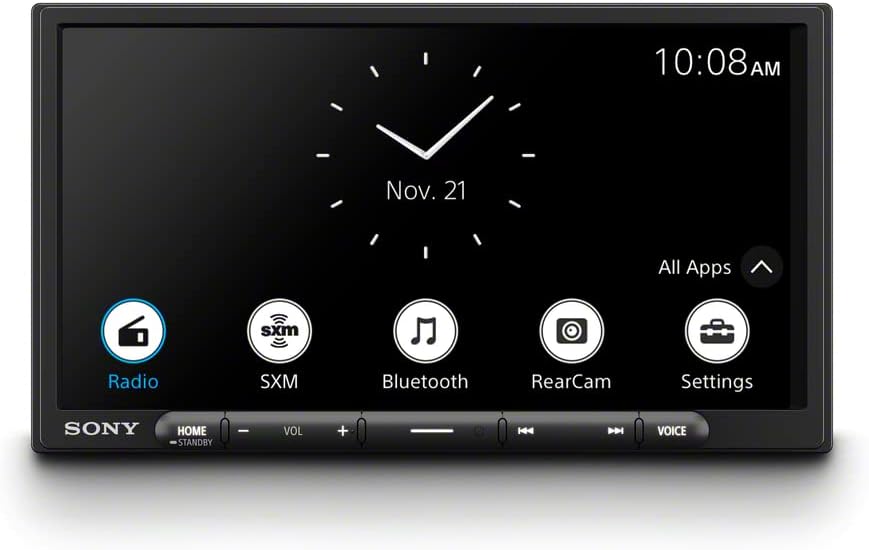
With its simple installation and top-notch wireless capabilities, the Sony XAV-AX4000 is the ideal choice.Tighter dashes are older. No cables or adapters will fit in a full-depth stereo. To suit, the AX4000 was designed.Before anything else, there’s enough area for wires behind the screen because the back chassis fits in a single-DIN slot.The next step is a 6.95-inch touchscreen with wireless Android Auto—no need to plug anything in.
The 14-band equalizer and built-in DSP with time alignment down to 1 cm are the finishing touches.Regrettably, there is no HDMI input. It has been observed that the screen can absorb a certain amount of sunlight. This is not the most recent design.Who it’s best for: drivers who want wireless done properly, drivers with narrow dashes, and DIY installers. Avoid: users that input video.
2: Sony XAV-AX6000 7-Inch Multimedia Receiver

The top-tier 7-inch screen with integrated HDMI, the Sony XAV-AX6000.At midday, the sun’s rays can destroy a screen. An amplifier is hindered by weak outputs. Both are fixed by the AX6000.To start, there’s an edge-to-edge glass capacitive touchscreen that never gets glare, even when the sun’s rays hit it.The next step is to connect a video via HDMI. You can do more than just use your phone on the screen when you connect it to an HDMI source.
As a last point, the pre-amp outputs for the front, rear, and subwoofer are 5-volt and gold-plated, providing a louder and cleaner signal for use with external amplifiers.However, there has been no change in screen size—it remains 7 inches. There is a separate listing for the backup camera. HDMI adapters and wires are not included.The ideal choice for those who own amplifiers, drive convertibles or trucks with bright cabins, or use video input. Movie buffs, this one isn’t for you.
1: Pioneer DMH-WT3800NEX 9″ Floating Display Car Stereo

Regarding Android Auto head units, the Pioneer DMH-WT3800NEX, a large-screen update designed for earlier dashboards, is the best option.In this area, every other choice stops at about seven inches and only displays a single item at a time. Locators or tunes. Always choose one.To start with, there’s a 9-inch floating capacitive screen. Its placement in relation to the dashboard is unrestricted by the aperture.Second, you can use the split-screen mode to view both Android Auto and the receiver’s own source on one screen simultaneously. No other option here accomplishes this.
Lastly, there is Android Auto, which is made wireless. Turn on the engine and the giant screen will be ready.Fourth, there’s built-in HD Radio and an automatic transition between Light and Dark Modes that you may program or activate with your headlights.Downside: it’s the most expensive option here. Make sure the vents are accessible in your dash before installing the floating screen. There has to be an app for Alexa on the phone.Trucks, SUVs, and older vehicles with smaller stock screens are the best options. Not recommended for: rushed situations or limited funds.
Things to Consider Before Buying a Android Auto Head Unit:
Choosing the right Android Auto head unit can transform your driving experience. With multiple options available, you need to weigh various factors to ensure compatibility with your vehicle. Understanding technology requirements, design preferences, and user functionality will help you make an informed decision that aligns with your lifestyle.
Single-DIN vs. Double-DIN Units
Single-DIN units measure approximately 7 inches wide and 2 inches tall, while Double-DIN units are approximately twice that height. Choosing between them often depends on the space available in your dashboard. Installing a Double-DIN unit generally provides more screen real estate and features, offering a more visually appealing interface. Many vehicles, especially more modern ones, are designed to accommodate Double-DIN units, making them a popular choice among users seeking enhanced functionality.
Wired vs. Wireless Connectivity Options
Choosing between wired and wireless connectivity can significantly influence your user experience. Wired connections, typically via USB, provide stable performance and quicker data transfer, allowing for faster smartphone integration. On the other hand, wireless connectivity offers convenience as it eliminates cable clutter and supports seamless audio streaming, enabling users to connect instantly. Weighing both options helps tailor the system to your preferences and driving style.
Dashboard Dimensions and Mounting Kits
Dimensions play a significant role when selecting a head unit. Measure the height, width, and depth of the existing space in your dashboard. Many aftermarket head units come with an array of mounting kits, which are designed to fit specific vehicle models. Consider whether you need a single-DIN or double-DIN unit, as incorrect sizing could leave you with gaps or require additional modifications. A good fit ensures easy access to controls and enhances the overall aesthetic of your car’s interior.
Steering Wheel Control and CAN bus Integration
Integrating your head unit with existing steering wheel controls enhances usability while driving. Check if the unit supports your vehicle’s CAN bus system, which allows communication between electrical components. Some head units offer compatibility with adapters that maintain steering wheel functionality, enabling you to control music and navigation without taking your hands off the wheel. Confirm that the proper connectors are available for your vehicle to ensure a straightforward installation and full feature utilization.
Enhanced navigation systems provided by Android Auto offer more than just turn-by-turn directions. Real-time traffic updates and alternative route suggestions make traveling more efficient and less stressful. Music streaming services, integrated voice commands, and easy access to various media apps create a comprehensive entertainment experience while you drive. These features often lead to improved overall satisfaction, especially for those frequently on long commutes or road trips.
Potential Software Lag and Hardware Limitations
Software lag can occasionally hinder responsiveness in some Android Auto head units, making navigation or music selection less fluid. Hardware limitations might also surface, particularly in budget options, where inferior processors can lead to longer load times or compatibility issues with more advanced features. Assessing the specifications of various models helps ensure that performance meets your expectations, ultimately affecting everyday functionality.
Screen Resolution and Touch Responsiveness
Optimal screen resolution directly affects clarity, especially when using navigation apps. A minimum resolution of 1280×720 pixels typically provides crisp images and easy readability. Invest in capacitive touchscreens, which are more responsive than resistive counterparts, allowing for swipes and taps to register quickly. Those with multi-touch capabilities can facilitate gestures, such as pinch-to-zoom, enhancing your interaction with maps and media.
Audio Output Power and Pre-amp Voltages
Power output and pre-amp voltage play significant roles in your audio experience. Aim for a head unit with at least 20 watts RMS per channel to fill your vehicle’s cabin with clear sound. Higher pre-amp voltages, specifically around 4 volts, result in better signal-to-noise ratios, reducing distortion and allowing for richer sound. These elements combined ensure your music plays back with the fidelity intended by the artists.
Researching Manufacturer Reputation and Reviews
Identifying brands with established trust can significantly enhance your confidence in a purchase. Explore user reviews across multiple platforms to gather insights into product performance and customer service experiences. Specific forums and tech review sites often provide detailed evaluations and comparisons, helping you discern consistent quality among different manufacturers. Comparing popular brands such as Pioneer, Kenwood, and JVC can reveal distinctions in reliability, feature sets, and value for money.
Conclusion
Making an informed decision when purchasing an Android Auto head unit requires careful consideration of various factors. Assess your vehicle’s compatibility and the features that matter most to you, such as display size and sound quality. Review user feedback and expert recommendations to identify reliable models. Ensure you budget not just for the unit, but also for any installation costs. A well-chosen head unit can transform your driving experience, offering functionality and connectivity that enhances your time on the road.
Leave a Reply