
Finding the best dash cam for your daily drive doesn’t have to be a headache. Are you worried about unfair insurance claims or unexpected accidents? You deserve a reliable copilot that captures crystal-clear footage when it matters most. We reviewed top-rated models to boost your vehicle security and give you instant peace of mind on the road. Stop guessing and start protecting your car today with these top picks.
Contents
- Top 5 Dash Cam:
- 1. VIOFO A229 Plus Dash Cam
- 2. ROVE R2-4K DUAL Dash Cam
- 3. REDTIGER F7N TOUCH Dash Cam
- 4. Terunsoul D016 Dash Cam
- 5. REDTIGER F7N PLUS Dash Cam
- Things to Consider Before Buying a Dash Cam:
- Front-Facing Dash Cams
- Dual-Channel Dash Cams
- 360-Degree Dash Cams
- Image Quality
- Storage Capacity
- Additional Features
- Brand Reputation
- User Reviews
- Advantages
- Disadvantages
- Preparing Your Vehicle
- Mounting the Dash Cam
- Configuration Settings
- Regular Software Updates
- Cleaning the Lens
- Checking Storage
- Summing up
Top 5 Dash Cam:
1. VIOFO A229 Plus Dash Cam

The VIOFO A229 Plus is your best bet for a dash cam that records every crucial moment on the road. Even in low-light or fast-moving traffic, the 2K quality captured by its innovative dual-channel HDR recording remains crisp. True 1440P resolution and improved color fidelity make every frame easier to review, keeping license plates, lane markings, and street signs sharper. Thanks to the front-facing camera’s 60 fps recording capability, blurred action and stable exposure in dynamic environments are both rendered more clearly.
Keeping both hands on the wheel allows you to maintain control. You can effortlessly capture photos, lock important clips, activate Wi-Fi, and change camera angles with just the sound of your voice thanks to the 12 built-in voice commands. Never miss a beat again—clear voice notifications let you know when there are changes to your settings or problems with your memory card.
You can get exact location, speed, and time data when you play back film in the VIOFO app or on your computer since the quad-mode GPS locks into four satellite positioning systems. The improved 5GHz Wi-Fi allows you to easily preview, download, and share videos, as well as change the video’s resolution and recording time, all from your mobile device.The addition of this small dash cam to your safety setup is a must if you are serious about always having trustworthy video proof.
2. ROVE R2-4K DUAL Dash Cam

The ROVE R2-4K DUAL dash cam can record footage from both the front and back of your vehicle simultaneously, ensuring that you get comprehensive coverage on every trip. In order to provide you with clear footage of what’s going ahead and behind, the front camera records in crisp 4K and the rear camera records in 1080P @ 30fps. Take in more of the road and its surroundings with each shot thanks to the 140-degree back view and 150-degree ultra-wide front vision.
Excellent performance is also achieved even in very dim conditions. Video captured at night or in low light is brighter, clearer, and more detailed thanks to the camera’s dual aperture system, which lets more light in through the front F1.5 and rear F1.8 lenses.The ROVE app may be accessed on your iOS or Android device thanks to the built-in dual-band 5GHz and 2.4GHz Wi-Fi. Instantaneous video preview, 20 MB/s downloads to your phone, sharing footage with friends or insurers, and wireless firmware updates and camera settings are all possible.
The embedded GPS not only records your route, location, and speed directly onto the video files, but it also shows you your speed and compass on the 3″ IPS screen in real-time. In the future, you can examine anything with mapped data using ROVE’s free GPS Player on your PC or Mac.You can count on this dual dash cam to be a dependable companion on every journey, providing better evidence, easier sharing, and more peace of mind.
3. REDTIGER F7N TOUCH Dash Cam

You may rest assured that the REDTIGER F7N TOUCH will be there for you silently every mile if you’re looking for a dash cam. Both the front and rear cameras provide extensive coverage, with the former recording in crisp 4K UHD with a STARVIS 2 sensor and a wide 170° angle and the latter in 1080P Full HD with a 140° angle. Your footage remains clear and useable even in low light, terrible weather, and tricky contrast thanks to WDR, HDR, and better night vision.
Maintaining composure allows you to give your full attention to the road. You may use your voice to lock emergency movies, activate Wi-Fi, or take a picture without using your hands. You can examine clips, alter settings, or take a fast photo with the snappy touchscreen, and if you want a more conventional feel, physical buttons are also available.Watch live video, download clips at up to 20MB/s, adjust settings, and share important moments with friends or your insurance company with the REDTIGER Cam app on Android or iOS. You may strengthen your case later by include your route, speed, and position in each video thanks to the built-in GPS.
The camera’s built-in 128GB card allows for automated overwriting of older footage during loop recording, and the G-sensor locks films in the event of a harsh brake or unexpected contact. This dual dash cam will make every drive more secure if you want dependable, hands-free protection and clear proof when it matters.
4. Terunsoul D016 Dash Cam

You can trust the Terunsoul D016 dash cam to be there for you no matter what. You get crisp, detailed footage of what’s going on in front of and behind your car because it captures in 4K. With its 170° ultra-wide front lens, you may record more important road information in each film, even when there are up to six lanes of traffic.
You can start using it immediately because a 128GB memory card is already inserted. The built-in G-sensor locks films when it detects a collision, preventing them from being overwritten, while loop recording keeps footage ongoing. Do you require a manual save? For one-touch emergency protection, simply press the lock button; for extended excursions, you can still expand storage up to 512GB.
Nighttime and bad-weather recordings are substantially more trustworthy for evidence thanks to Super Starlight Night Vision’s improved WDR and sharper night vision technology, which maintains colors vivid and details apparent even in tough circumstances.You can connect to the Terunsoul App on your iOS or Android phone over dual-band 5.8GHz and 2.4GHz Wi-Fi. From there, you can see live video, download footage quickly, share them with family or insurance, and wirelessly manage firmware or settings.
The integrated GPS system not only displays your current speed and direction on the 3″ IPS screen, but it also adds your route, location, and speed to any movies you record. Whenever you need solid proof, you can review everything via the app or the free GPS Player on your PC.
5. REDTIGER F7N PLUS Dash Cam
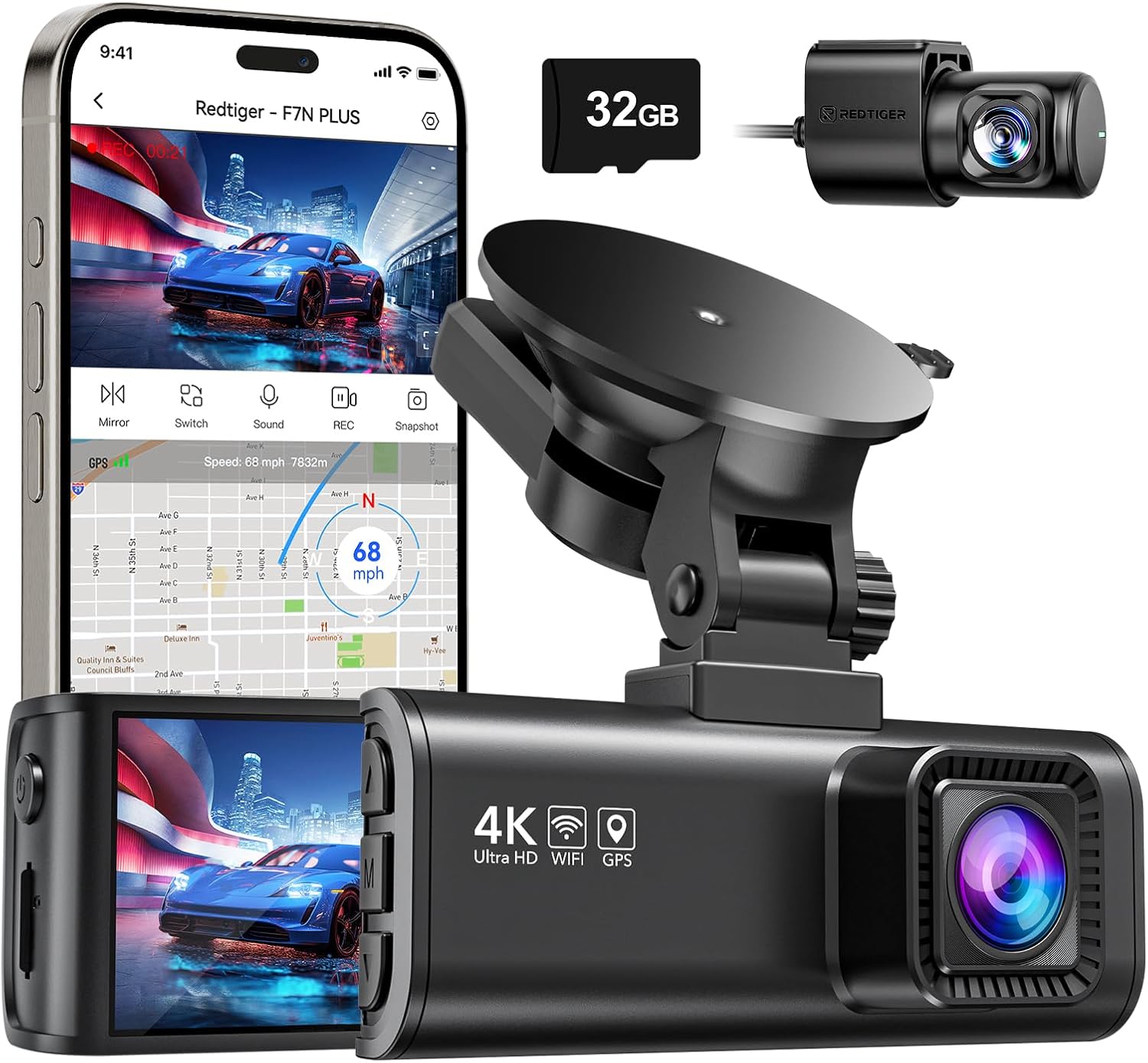
The REDTIGER F7N Plus is an excellent choice if you’re looking for a dash cam that will support you in both routine and emergency situations. You can see road signs, lane markings, and registration plates clearly thanks to the front and back cameras’ Ultra HD 4K and 1080P recording capabilities, respectively. Covering more ground and reducing blind spots, the 170° front and 140° rear wide-angle view is essential for gathering strong evidence following a collision.
Using the dash cam’s built-in Wi-Fi, you can link it to your smartphone and control it with the Redtiger Cam app, which is available for both iOS and Android. It only takes a few taps to share memorable events or beautiful drives with loved ones or your insurer, as well as to watch and replay film, download clips, and edit them.
With each recording, the built-in GPS records your route, speed in real-time, and location. If an incident should arise, you can later review your drives on Google Maps within the app or with the Windows/Mac GPS Player, providing you with further evidence.By replacing older film, loop recording keeps the camera running even when the memory card is full, and the G-sensor locks and stores videos in the event of a sudden collision, preventing their erasure. Protect your vehicle even when you’re not there with a 24-hour parking monitor that can record time-lapse footage.
Things to Consider Before Buying a Dash Cam:
You should prioritize video quality, mounting, power and storage when choosing a dash cam; assess resolution, frame rate, night performance, and HDR for reliable footage, check wide field of view and stable mounting, confirm loop recording, parking mode and reliable power/connectivity, consider GPS and audio needs, and verify warranty, app usability and legal/privacy implications so your purchase matches your driving habits and evidence requirements.
Front-Facing Dash Cams
You’ll get the most value-per-dollar with a front-facing cam: common specs include 1080p at 30-60fps or 4K at 30fps, a 120°-170° field of view, loop recording in 1/3/5-minute segments, and support for 32-256GB microSD cards; manufacturers quote plate-read range-often 30-60 feet-so check examples like 1080p@60fps for clearer night plates.
Dual-Channel Dash Cams
You should consider dual-channel if you want both forward and rear protection: typical setups pair a 1080p front camera with a 720p or 1080p rear camera, provide synchronized timestamps and parking mode when hardwired, and usually require a 64-256GB card to avoid overwriting critical footage quickly.
More detail: dual-channel recording increases storage and power needs-expect roughly 2-4GB per hour per 1080p channel at moderate bitrate, so a 128GB card can store about 16-32 hours depending on compression; installation matters, as rear cameras often need a routed cable through headliner and a clean rear-window mounting for plate visibility, while GPS timestamps and dash-cam app synchronization simplify incident reporting for insurers and police.
360-Degree Dash Cams
You’ll get continuous panoramic coverage with 360° models that stitch two or more sensors into a single view; common outputs are 2.5K-4K equivalent, ideal for parking surveillance and hit-and-run scenarios where side or rear impacts occur, but expect higher storage and heavier CPU demands for playback and de-warping.
More detail: 360° footage can consume 20-40GB per hour at higher quality, so use UHS‑I U3 or faster cards and verify the camera’s max supported card; playback usually requires the vendor’s app to de-warp and extract angles, and you should test how well license plates render at 30 feet in both day and low-light-some models sacrifice plate clarity for full coverage.
Any decision should balance coverage, resolution, and storage to match your driving patterns and evidence needs.
Image Quality
You should prioritize sensor type and bitrate: Sony STARVIS or IMX sensors markedly improve night footage, while HDR/WDR balances headlights and shadows. Opt for at least 1080p@60fps for smoother motion; choose 1440p or 4K if you need license-plate legibility at distance. Aim for video bitrates in the 15-30 Mbps range to avoid heavy compression artifacts in busy urban scenes.
Storage Capacity
You’ll need a high-speed microSD (UHS‑I U3/V30) and adequate capacity for your resolution and parking mode needs; 64GB typically stores ~8-12 hours of 1080p at ~15 Mbps, 128GB holds ~16-24 hours, and 256GB suits continuous 4K or long parking surveillance. Check your camera’s max card support and use cards rated for endurance.
Pay attention to endurance and formatting: many dash cams cap at 256GB/512GB and perform poorly with generic cards, so buy dash-cam-rated cards like Transcend High Endurance or Samsung PRO Endurance. Reformat in the camera every few weeks to reduce file corruption, set loop lengths (1/3/5 minutes) for easier clip retrieval, and verify the camera’s max supported size before upgrading.
Additional Features
You should evaluate GPS for speed/location metadata, Wi‑Fi for quick downloads, and dual-channel setups if you need rear coverage; parking modes often require hardwiring or dedicated batteries. Also check power design-supercapacitors handle heat better than cheap lithium cells-and decide if cloud uploads or app-based management are worth the subscription cost.
For use cases like ride-share or fleet vehicles, dual-channel with synchronized timestamps and GPS logs provides stronger evidence, while cloud backups give instant off-site access at extra cost. Test ADAS features and driver alerts in real conditions because calibration and camera angle affect reliability, and ensure any parking-mode draw has a voltage cutoff to protect your battery.
Brand Reputation
You should favor brands with long histories of firmware support and clear warranty policies; manufacturers like Nextbase, BlackVue, Thinkware, Viofo and Garmin frequently appear in buyer guides and lab tests. A brand that issues regular firmware updates and posts changelogs demonstrates commitment to performance and security.
After checking brand names, verify warranty length (1-3 years), ease of RMA service and availability of official accessories; brands with active user communities and documented service centers reduce downtime if a unit fails.
User Reviews
You should scan user reviews for consistent patterns: look for many reviews (100+ helpful) mentioning long-term reliability, night-time license-plate capture, and post-crash file integrity. One-off glowing or negative comments matter less than repeated reports about firmware bugs or mounting failures.
After filtering for verified purchases and chronological trends, consult community threads on Reddit and YouTube video comparisons that test night vision, parking mode and heat tolerance to get an evidence-based sense of real-world performance.
Advantages
You gain objective, timestamped evidence that often speeds up investigations and deters fraud; 1080p at 30-60fps or 4K options make license plates readable at typical crash distances (20-40 ft), and parking mode captures incidents while you’re away. Many models include GPS, wide 140°-170° lenses, and features like loop recording and ADAS, offering tangible safety and post-incident value for most drivers.
Disadvantages
You face privacy, legal, and operational trade-offs: audio recording laws differ, parking mode can strain your battery unless hardwired, and low-light performance or compression artifacts can render footage unusable. Also expect ongoing costs for high-capacity microSD cards (32-256GB) and optional cloud subscriptions that add monthly.
More specifically, microSD cards have finite write cycles so choose high-endurance UHS-I U3 cards and replace them periodically; hardwiring with a low-voltage cutoff or using a capacitor model prevents vehicle battery drain and extends device life. Additionally, check local statutes on audio/video capture and windshield placement, and test night footage-some sensors handle glare and HDR much better than others, making real-world performance variable across models.
Preparing Your Vehicle
You should park on flat ground with the handbrake engaged, clean the windshield area with isopropyl alcohol, and decide whether the camera sits behind the rearview mirror or lower for unobstructed view; check the owner’s manual for fuse box location and confirm the vehicle’s 12V accessory or accessory-on fuse to avoid draining the battery during long park intervals.
Mounting the Dash Cam
Place the camera centered on the windshield about 1-2 inches below the rearview mirror so it records license plates at typical highway speeds; peel the adhesive film, press firmly for 30 seconds, and avoid mounting over defrost lines or sensors that can distort images.
For permanent installs use the adhesive pad in temperatures between 10-40°C and let it cure 12-24 hours for max hold; choose a suction cup only for temporary use, and tuck the cable into the headliner and A‑pillar trim, routing below the dash to the fuse box to keep wiring clear of airbags and joints.
Configuration Settings
Set resolution to 1080p or 1440p for balanced storage and detail (4K increases file sizes ~4×), choose 30 or 60 fps based on night vs. motion needs, enable loop recording in 1/3/5‑minute segments, set date/time, format the microSD in camera, and adjust G‑sensor sensitivity to medium for typical impact detection.
Consider storage impact: a 64GB UHS‑I U3 card holds roughly 6-10 hours at 1080p/30fps but only about 1.5-3 hours at 4K/30fps; enable WDR/night mode if available, update firmware before finalizing settings, and if you use parking mode, hardwire the unit or use a low‑current draw kit to avoid draining your battery.
Regular Software Updates
You need to check for firmware and app updates at least monthly or whenever you notice GPS, G‑sensor, or parking‑mode quirks; manufacturers like BlackVue and Thinkware release patches that improve event detection and stability. Use the official app or website, read changelogs for bug fixes, and back up your settings before updating. Updating can resolve recording gaps, improve file compatibility, and occasionally add features such as improved compression or cloud integration.
Cleaning the Lens
You should clean the lens weekly in dusty environments or biweekly otherwise, using a soft microfiber cloth and a dedicated lens solution; avoid ammonia‑based glass cleaners and paper towels that scratch coatings. Start with a burst of compressed air to remove grit, then wipe gently from the center outward in a circular motion, and never apply liquid directly to the lens surface.
For stubborn oil or insect residue, turn the dash cam off and dampen a microfiber cloth with a small amount of 70% isopropyl alcohol or lens cleaner-apply the cloth, not the liquid to the lens. Use light pressure and multiple passes rather than scrubbing; inspect for micro‑scratches and, if present, consider replacing the protective cover or using a hard‑coated replacement to maintain image clarity in low light.
Checking Storage
You should use high‑endurance microSD cards (Class 10, U3/V30) sized typically 32-256 GB and format them in the camera every 1-3 months to prevent fragmentation. Monitor loop length (1-5 minutes recommended) and check for error indicators or skipped files; set up automatic backups to a PC or cloud for crucial events. Replace cards used continuously for 12-24 months depending on write volume.
To diagnose storage issues, connect the card to your computer and run a surface test (H2testw) or manufacturer utility to verify capacity and sustained write speed-U3 cards should maintain ~30 MB/s. If write speed falls below ~10 MB/s, corrupted files appear frequently, or chkdsk reports errors, rotate to a fresh card and archive important clips before reformatting or discarding the failing card.
Summing up
Hence, you should prioritize features that match your driving needs-video resolution, night vision, field of view, parking and impact detection, GPS and cloud connectivity-while assessing build quality, power and storage options, mounting flexibility, user interface, warranty and legal compliance, then balance those against budget to select a reliable dash cam that protects you on the road.
Leave a Reply