
If you’re hunting for the best photo printers that deliver stunning, high-resolution prints, you’re in the right spot. We understand the frustration of blurry images and wasted time. Our guide uncovers top printing technology options that promise quality and reliability, ensuring every memory is captured perfectly. Experience the thrill of vivid, lifelike photos printed flawlessly. Let’s jump right in to explore your ideal photo printing solution.
Contents
- Top 5 Photo Printers:
- 1. Canon imagePROGRAF PRO-310
- 2. Epson EcoTank Photo ET-8500
- 3. Epson EcoTank ET-2400
- 4. Canon Pixma MG3620
- 5. Fujifilm Instax Mini Link 3
- Things to Consider Before Buying a Photo Printer:
- Key Specifications That Matter: DPI, Color Depth, and More
- Real-World Testing: What Reviews Don’t Tell You
- Printer Compatibility with Devices and Operating Systems
- Wireless vs. Wired: Choosing the Right Connection
- Home Office vs. Professional Studio: What Suits Your Needs?
- Portability Considerations for On-the-Go Photographers
- Essential Software for Optimal Performance
- Customer Support and Warranty: What to Expect
- Summing up
Top 5 Photo Printers:
1. Canon imagePROGRAF PRO-310

The Canon imagePROGRAF PRO-310 is for you, if you are looking for a top-performance and reliable printer. The third best inkjet printer uses a 9-color + Chroma Optimizer pigment-based inks, so your images look like they’re hanging up on the wall of an art gallery. When you’re printing professional work, or memories of a lifetime, the PRO-310 lets you do that in accurate, vibrant colours every time.
The printer is also made with beneficial features such as the Anti-Clogging System and Skew Correction, to make productivity higher and minimize interruptions. This allows stunning contrast in your work, and also helps the Matte Black ink to create a nice black density with very good reproduction of dark areas due to having (achieved) a wider gamut/palette.
You will have no difficulty in knowing your printer status with 3.0-inch color LCD monitor. With this very user-friendly display, you can know at a glance the level of ink available to your printer and how it stands in terms of other settings.
Additionally, the new LUCIA PRO II ink brings better gloss uniformity and heightened scratch resistance, making your prints not only visually appealing but durable.
With 31.6 pounds of weight, the Canon imagePROGRAF PRO-310 is perfect for creative purposes. Printing as fast as 2.0monochrome wages per min in color or monochrome, the Pro-1000 stabilizes high quality and also efficiency making it perfect for artists, photographers, and experts alike.
2. Epson EcoTank Photo ET-8500

On the hunt for a printer that revolutionizes your photo printing habits, the Epson EcoTank Photo ET-8500 comes to mind. The cart FREE solution and HIGH quality borderless photo printing along with VIVID images and crystals clear text, not only lab-quality also give a very pure & perfect justification allows you to enjoy hassle-free Changing of cartridges again is history! Thanks to Epson’s innovative Claria ET Premium 6-Color inks and ultra high precision printhead, you can now print with an impressive 4″ x 6″ photo paper at just15 seconds.
Here the ET-8500 scores highly thanks to its exceptional media handling specs. It can print borderless images up to 8.5″ x 11″ on a range of media types, including cardstock and specialty materials up to 1.3 mm thin. And all of these products offer auto duplex printing. forsustainquality (andeverything else).
The ET-8500 makes waste minimal through the use of high-yield ink bottles, which replace around 100 single units for each set. It suggests less going to and fro the store and better way of printing.
You will also love the connectivity options of this printer which are relentless. Print, scan and manage your tasks from anywhere using the Epson Smart Panel app on your desktop with Wi-Fi, USB and Ethernet capabilities. It features a 4.3″ touch display which provides ease of operation as well as voice activated printing capabilities.
At the end, it is created to meet your need for being creative with Epson EcoTank Photo ET-8500!
3. Epson EcoTank ET-2400

The Epson EcoTank ET-2400 is a great performing photo printer commended for your office or home. Its new cartridge-free design promises to save money, since you merely fill the ink tank using cheap ink bottles. That works out to around 80 single cartridges in each bottle set, which is a massive reduction in overall printing expense.
You can easily print from multiple devices seamlessly as this printer provide wired and wireless connectivity options. The Epson EcoTank ET-24000 also lets you print via a USB connection or wirelessly from your smartphone or tablet as well. The rear-feed input tray of this Pixma printer can contain up to 100 sheets, so you will have a good reserve of paper for those heavy-duty print assignments and not having to reload regularly.
And the EcoTank ET-2400 is not just built for printing documents, it also excels at color prints to make your photos or presentations pop. It has quite a fast print speed of 10 pages per minute for black and white and 5 pats per minute print speed for colors to ensure your all printing jobs are done effectively, and in great quality.
It is also Energy Star-compliant to maintain power efficiency. This printer can fairly address your printing, copying and scanning needs with cost-efficient, high-quality printing capabilities.
4. Canon Pixma MG3620
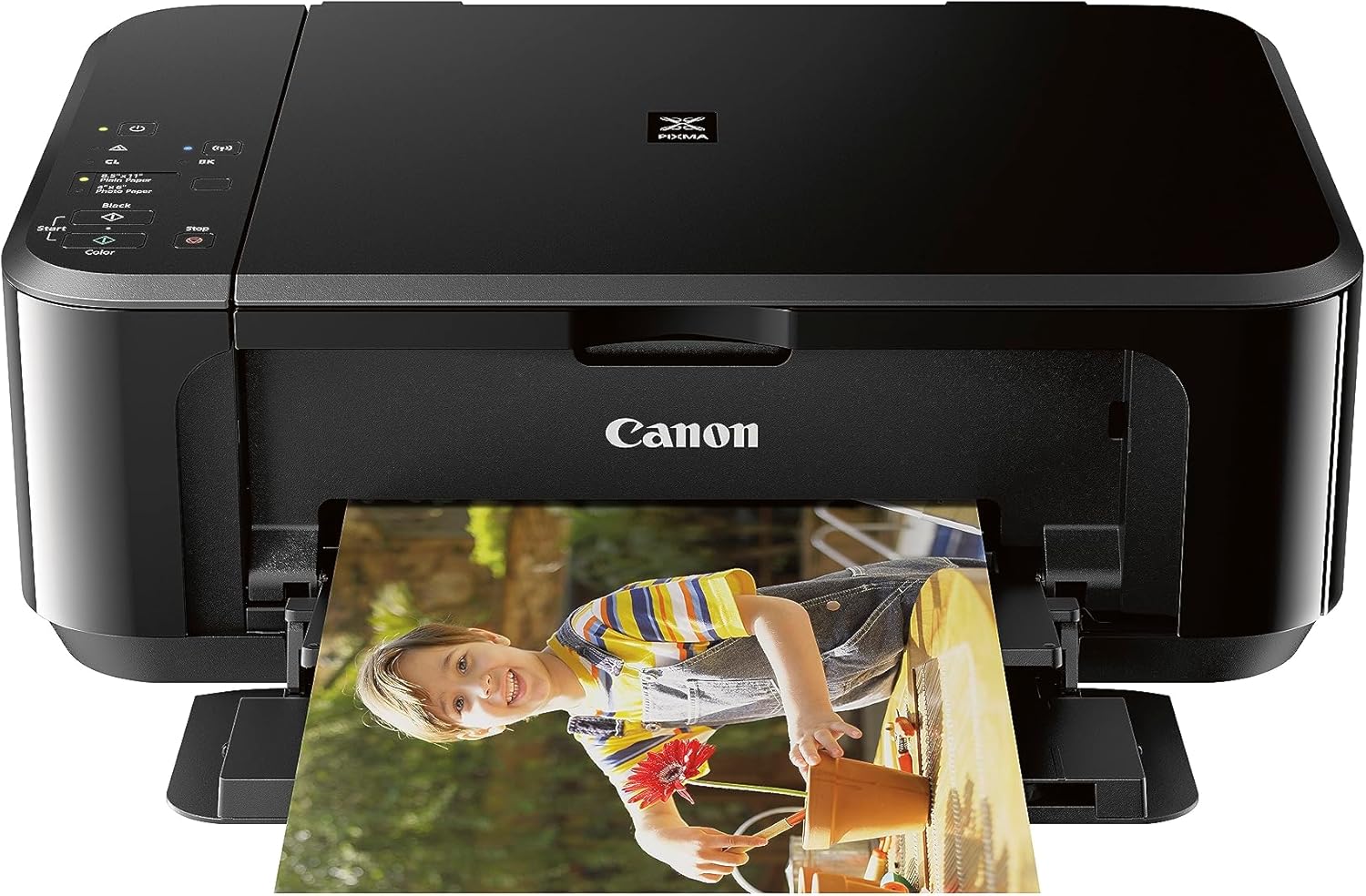
If you are considering a low-cost printer suitable for your everyday printing, perhaps the Canon PIXMA MG3620 is worth looking at. This all-in-one color inkjet printer is the budget-friendly offering on this list, and although you can’t expect top notch color accuracy from a such an inexpensive printer out of the box, it is adequate for most tasks you need to complete, from documents to charts.
Although it did not deliver the same detailed text and crisp graphics as we saw on some other models, it is nonetheless capable of performing borderless printing and supports sizes up to 8.5″ x 11″ standard paper size. This especially good if you are working on professional materials at home or in a school.
But you have to take its pages yield into account. This printer should be just fine for the occasional print but if you plan to print regularly, look elsewhere. Note you must apply a tri-color cartridge, if you print frequently the price of replacement ink will blow.APPLAUSEPOINTS That means you have to replace whole the cartridge even if only one color is used up.
To summarize, the Canon PIXMA MG3620 strikes balance on both price and function, making it a solid choice for modest users. The printer has a few shortcomings in print quality and ink efficiency, but if you are used to other Brother products it will only stick out from the pack by looking more attactive. If you need a printer for basic-printing needs, whether it be for homework, documents or photos, this printer can offer some help without too much dollars.
5. Fujifilm Instax Mini Link 3

If your main goal is to quickly and reliably print smartphone photos in a portable, easy-to-use size, the Fujifilm Instax Mini Link 3 Smartphone Printer is just for you. With every print, this printer may give you high quality photographs that we learned from our tests. With an easy to use mobile app — which also steamrolls setup — allowing comfortable monitoring from anywhere you are on earth, it is a perfect fit for any situation.
Measuring just 3.5 by 4.9 by 1.4 inches and weighing only 7.4 ounces (or 8.7 ounces with a film pack), the Mini Link slack fits in your bag of choice This is excellent for gatherings, parties or even a casual outing where you just want to take and share moments fast.
You will likely love the nice contrast as well film-like colors that add a nostalgic feel to your images. This gives every print a lovely character, making your memories feel even more special in print form.
The Instax Mini Link 3 helps you bring your digital memories to life with new prints of your recent trip, night out with friends, or special family time. Turning us to hold in our hands all these transient moments of joy, pushing us out there to celebrate the small stuff in ways that are unique and interactive.
Things to Consider Before Buying a Photo Printer:
Most of your choices should be guided by print quality, color accuracy, ink costs, and paper compatibility; also consider print speed, borderless and wireless printing, mobile workflow, cartridge availability, and long-term running costs so you pick a printer that fits the photos you make and how often you print.
Key Specifications That Matter: DPI, Color Depth, and More
DPI gives a rough sense of dot placement but droplet size (1–10 picoliters), inkset (CMYK vs CMYK+photo black/light inks), and color gamut often matter more. You’ll want a printer that supports 8-bit or 16-bit workflow through the driver and good ICC profiles for your papers. Pigment inks usually offer better longevity and less bronzing; dye inks often render more saturated colors. Check manufacturer gamut charts and whether the printer offers dedicated gray or red inks for flesh tones.
Real-World Testing: What Reviews Don’t Tell You
Lab reviews frequently use a single glossy paper and ideal lighting, so you should test prints across the papers you actually use—matte, luster, and baryta behave differently. Watch for banding in smooth gradients, metamerism under warm vs cool light, and subtle hue shifts in skin tones. Print speed, driver quirks, and how often the printer initiates automatic head cleans will affect your daily workflow far more than a one-off lab score.
Run simple, targeted tests: a skin-tone gradient, a 21-step grayscale ramp, fine-line text at 6–8 pt, and a saturated color patch sheet. Inspect prints under a D50-balanced lamp or natural daylight and compare against a calibrated monitor using an ICC profile. Note drying time, gloss differential on mixed-ink areas, and how many minutes an 8×10 highest-quality pass takes—expect anywhere from 2 to 10 minutes. If you can, use a spectrophotometer (X-Rite or similar) to quantify delta-E for serious comparisons.
Printer Compatibility with Devices and Operating Systems
Verify driver and protocol support before buying: Windows 10/11 and macOS are covered by most manufacturers, while Linux support can be spotty and often requires community drivers. Look for AirPrint (Apple) or Mopria (Android) branding if you print from phones or tablets. Camera-to-printer standards like PictBridge or SD-card slots let you bypass computers entirely. Check the manufacturer’s support page for exact OS versions—older models may not support the latest macOS 13+ or upcoming Windows feature updates.
Wireless vs. Wired: Choosing the Right Connection
Decide whether mobility or reliability matters more: Wi‑Fi (802.11ac/ax) and Wi‑Fi Direct let multiple phones and tablets print easily, while USB 3.0 (5 Gbps) or Gigabit Ethernet (1 Gbps) gives you consistent throughput for large TIFFs and high-res CMYK RIP jobs. Bluetooth is handy for quick mobile prints but limited in file size and range. Note that cloud services vary—AirPrint and Mopria are widely supported since Google Cloud Print ended in 2020.
For studio or professional use, wired Gigabit Ethernet with a static IP or a dedicated print server minimizes interruptions and keeps large print files moving without packet loss; enable QoS on the switch if multiple devices share the network. Home setups benefit from a dual‑band router (5 GHz for speed, 2.4 GHz for range) and placing the printer within strong signal range; choose WPA3 or at least WPA2 encryption to protect files. If you frequently print from cameras, prioritize models with SD/USB slots or Wi‑Fi Direct so you can avoid network dependency. For mixed environments, look for printers that support both USB/Ethernet and AirPrint/Mopria to give you the flexibility of wired speed and wireless convenience.
Home Office vs. Professional Studio: What Suits Your Needs?
If you print a few 4x6s or occasional 8x10s, a compact 13×19 inkjet or dye‑sublimation unit saves space and costs; expect lower-capacity cartridges and simpler color controls. Producing 50–200 prints per week or gallery-sized work pushes you toward 17–24 inch pigment‑ink printers like the Epson SureColor P800 or Canon imagePROGRAF, which offer larger ink tanks, advanced paper handling, RIP support, and more accurate color profiling for consistent, sellable output.
Portability Considerations for On-the-Go Photographers
Look for size, weight, power options, and print speed: pocket printers such as the HP Sprocket or Canon IVY weigh under 500 g and produce 2×3 prints in 40–60 seconds, while compact dye‑sub units like the Canon Selphy are still small enough for a camera bag and deliver 4×6 prints in about a minute. Confirm Bluetooth support, USB‑C power or battery compatibility, and whether the device fits your typical print sizes and media types.
Also plan for durability and workflow: choose a model that accepts USB power banks if you’ll be at festivals or remote shoots, and prefer dye‑sublimation for smudge‑resistant, continuous‑tone 4x6s at events; ZINK and peel‑and‑stick options are lighter but trade off color depth. Test connection stability with your phone or camera — poor Bluetooth pairing can add minutes per print during busy events — and carry spare media and a protective pouch to avoid jams and scratches on the road.
Essential Software for Optimal Performance
Choose a printer with software that matches your workflow: Lightroom/Photoshop integration for soft-proofing, manufacturer ICC profiles for each paper, and options for 16-bit rendering. Epson Print Layout and Canon Professional Print & Layout add black-and-white modes and layout controls, while RIPs like ImagePrint or Wasatch give you finer halftone and dot gain control for galleries or short-run commerce. Verify availability of regular driver updates and mobile apps (HP Smart, Canon/EPSON apps) so you can print reliably from your preferred device.
Customer Support and Warranty: What to Expect
Expect a baseline 1-year limited warranty from most consumer brands, with pro models often offering 2-year or on-site options; support channels usually include phone, chat, email, and searchable knowledge bases. You’ll want clear policies on printhead coverage (some brands exclude damage from non‑OEM ink) and turnaround times—typical response windows are 24–72 hours for initial support, while repairs or replacements depend on local service centers.
Dig into the fine print before you buy: check whether warranties cover consumables or only hardware, whether mail‑in service requires you to pay shipping, and if express on‑site repair adds cost. Consider the real cost of common failures—printhead replacements can run from roughly $100 to $600 depending on model—and whether extended service plans or pro-care contracts (often available for $100–$400 annually) make financial sense when you print hundreds of photos monthly.
Summing up
Ultimately, you should weigh print quality, color accuracy, paper size options, running costs, speed, connectivity, and ease of use against your budget and workflow; choose a model that matches your intended print volume and media types so you get consistent, professional results and predictable operating costs over time.
Leave a Reply