
Finding the best portable monitor is the ultimate game-changer for anyone tired of working on a tiny, cramped laptop screen. You deserve a seamless dual-screen setup that fits right in your backpack. Imagine the pure freedom of a stunning external display that lets you crush your goals from any location. We’ve tested the top models to find the perfect balance of clarity and speed. Let’s explore our top picks.
Contents
- Top 7 Portable Monitor:
- 7: KYY 15.6″ Portable Monitor (FHD HDR)
- 6: ARZOPA A1 15.6″ Portable Monitor (FHD)
- 5: ASUS ZenScreen MB169CK 15.6″ Portable Monitor
- 4: ARZOPA Z1FC 16.1″ 144Hz Portable Monitor
- 3: Lenovo L15 15.6″ Portable Monitor
- 2: ASUS ZenScreen MB16ACE 15.6″ Portable Monitor
- 1: ViewSonic VX1655 15.6″ Portable Monitor (60W USB-C PD)
- Things to Consider Before Buying a Portable Monitor:
- Bus-Powered vs. Internal Battery Models
- Touchscreen and Stylus Support Variations
- Display Panel Technology and Resolution
- Connectivity Standards and Port Layouts
- Mobility and Productivity Advantages
- Limitations in Ergonomics and Peak Brightness
- Checking Power Delivery Requirements
- Verifying Operating System and Driver Support
- Essential Protective Gear and Carry Cases
- Cable Care and Connector Safety
- Final Words
Top 7 Portable Monitor:
7: KYY 15.6″ Portable Monitor (FHD HDR)

For first-time customers in 2026, the best ultra-budget portable monitor is the KYY 15.6″.Every window on your laptop is squeezed into 13 inches by the built-in screen. Slack, meetings, and notes all vie for attention.That is terminated by the KYY.The 15.6-inch Full HD 1080P IPS panel is first. It’s sharp, has wide viewing angles, and makes reading from any position a breeze.You can connect your laptop, phone, console, or tablet directly to it thanks to its USB-C and HDMI ports.
Last but not least: a clever cover that doubles as a kickstand to shield the screen from damage and elevate it on hotel desks.Con: compared to name-brand products, the build feels cheap, the brightness is only adequate, and there is no anti-glare coating for really light environments.Who it’s best for: first-time consumers of portable monitors, budget-conscious travelers. Avoid outside exposure or tasks requiring precise color reproduction.
6: ARZOPA A1 15.6″ Portable Monitor (FHD)

When it comes to portable, lightweight options for remote workers, the ARZOPA A1 is your best bet.The less expensive monitor you found is cumbersome, looks cheap, and would be unattractive on a client’s desk.That is remedied by the A1 with its premium-feeling construction.The first is a chassis that is incredibly thin and light at 1.7 pounds; it can fit neatly into a laptop bag with your MacBook.Now we have USB-C and tiny HDMI inputs, so you only need one connection from most new computers (no extra dongles required).
The last feature is an integrated folding kickstand that may be used at an inclination from vertical to almost flat, eliminating the need for a separate cover.Downsides: only 60 Hz, no touch, no way to charge your laptop through the cable, and the speakers are too quiet for video conversations.Those that commute regularly, work at a desk all day, or are on the go for sales can benefit the most. Do not use if you require a powerful laptop or a high refresh rate.
5: ASUS ZenScreen MB169CK 15.6″ Portable Monitor

For those on a budget who still want a name-brand option, the ASUS ZenScreen MB169CK is hard to beat.When thrown into a bag, inexpensive monitors will malfunction. Before a client visits, you must not risk that.At its entry-level pricing point, the MB169CK embodies ASUS engineering.One USB-C connector lets you attach your device, and the other can charge it even as the display is in use.A 16-inch anti-glare IPS screen, suitable for use in well-lit public spaces like train stations and hotel lobbies, will follow.
As a last feature, it has a 360-degree kickstand that can be used in landscape or portrait mode, respectively, to accommodate long papers or code.Downsides: it’s more than 2 pounds heavier than ultralight alternatives, it doesn’t have a battery, and certain older laptops could require an additional powered hub to power the screen.Perfect for: highly mobile workers, frequent fliers, and those who value functionality above all else. People on a tight budget or looking for a pre-assembled case should not buy this.
4: ARZOPA Z1FC 16.1″ 144Hz Portable Monitor

For remote professionals who juggle multiple tasks at once, the ARZOPA Z1FC is the ideal mid-range option.When you start scrolling through massive spreadsheets or switching between five apps simultaneously, a sixty-hertz monitor feels sluggish.Lag is dead in the Z1FC.The first is a 16.1-inch full-high-definition (144 Hz) screen, which is far more fluid for things like scrolling, tracing the mouse, and practicing presentations.The next step is a 106 percent sRGB color coverage, which means that all of your creative work, branding materials, and images will appear great.
Now you can have a bigger screen without lugging along a heavier backpack thanks to HDR support and an ultra-slim design with an integrated kickstand.Disadvantages: No power passthrough to charge the laptop, 144 Hz drains the battery faster over USB-C, and 1080p at 16 inches still implies lesser pixel density than 2K competitors.Recommended for: people who multitask a lot, analysts who have a lot of sheets to juggle, and casual gamers. Those who are looking for 4K or who are traveling with a sensitive battery will not find this useful.
3: Lenovo L15 15.6″ Portable Monitor
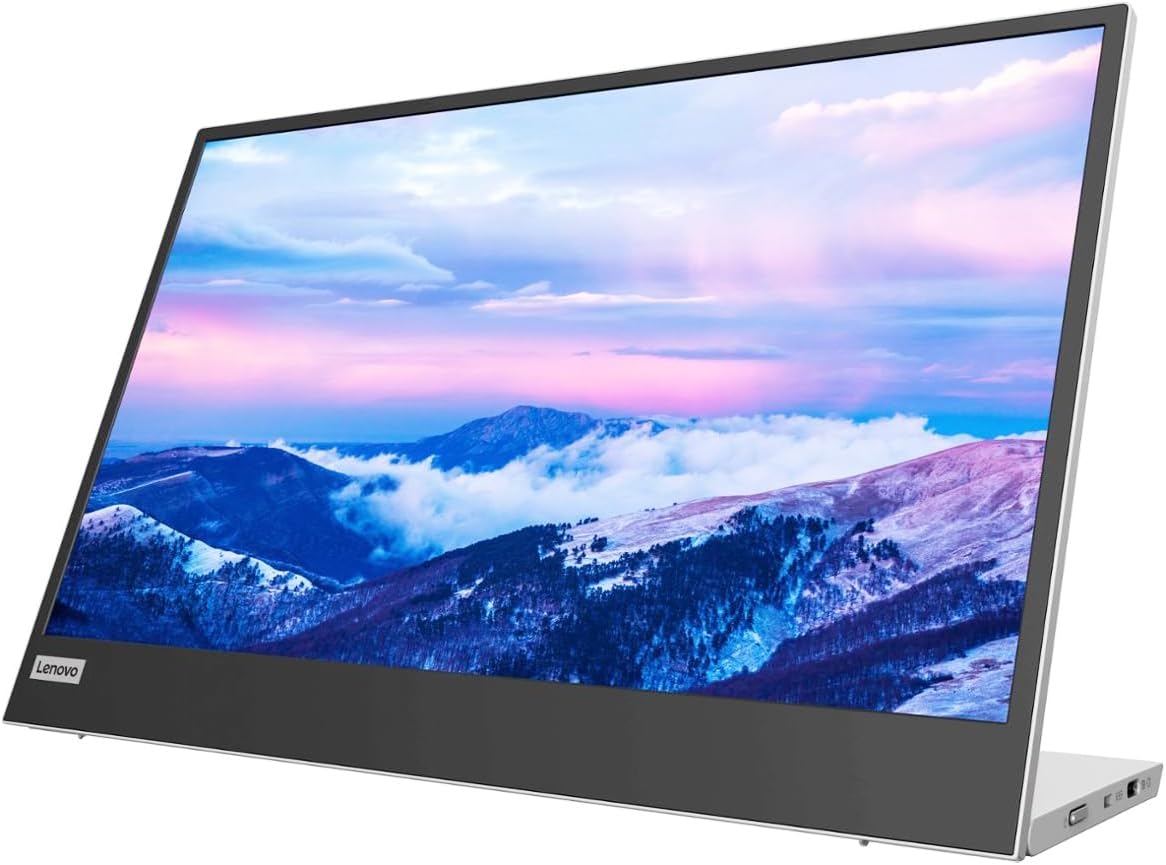
For business travelers who do most of their work from the comfort of their hotel room, nothing beats the Lenovo L15.As of right now, every single portable display makes use of a weak kickstand that sways whenever the screen is touched. Working for a living, that gets old quickly.With its sturdy base, the L15 eliminates swaying.Firstly, the only monitor in this movie that genuinely rises to eye level has a height-adjustable integrated stand.After that, there’s a 15.6-inch Full HD IPS display with 250 nits—the same high-quality color and brightness that ThinkPad customers have come to expect from Lenovo.
And lastly, two USB-C connections allow for a single-cable setup; all you need is a contemporary laptop to get to work.Disadvantages: limited to 60Hz, no battery, slightly heavier than alternatives with kickstands, and no anti-glare coating.If you suffer from neck ache, use this product regularly whether working from home or in a hotel room. We will not be accommodating ultralight packs or anyone looking for 4K content.
2: ASUS ZenScreen MB16ACE 15.6″ Portable Monitor

The ASUS ZenScreen MB16ACE is the top choice among premium options for remote workers who deal with clients. All of the components are subtly raised by the MB16ACE.To start with, there’s the ultra-thin Full HD IPS panel. It’s thinner than a hardback book and can fit flush in the main pocket of your laptop bag.After that, there’s a USB Type-C port with an anti-glare surface that’s good for your eyes, so you can use it to make and receive calls without straining them from bright hotel lights.
The package concludes with a Lite Smart Case, which serves as both a traveling case and a sturdy kickstand when folded.Limitations include a low brightness of 250 nits, a single USB-C port that requires an adaptor for older computers, and a maximum refresh rate of 60Hz.This is the ideal solution for anyone looking to safeguard their brand, including consultants, account executives, remote workers who interact with clients, and others in similar roles. Not recommended for: people who need a lot of refreshment.
1: ViewSonic VX1655 15.6″ Portable Monitor (60W USB-C PD)

The ViewSonic VX1655 is the greatest portable monitor of 2026. It was designed for remote workers who are sick of dealing with cords.If you want to watch this film on any of the other monitors, you’ll need to bring along a power brick, a travel adaptor, a USB-C cable, and a separate charger for your laptop.That is put to an end by the VX1655.To start, the display has 60-watt USB-C Power Delivery, which means it can charge your laptop using the same cable.
Second, it has a 15.6-inch Full HD IPS screen with an integrated stand that can switch between landscape and portrait modes and is more sturdy than any available folding kickstand.As a backup, there’s a small HDMI port that you can use with older laptops, game consoles, and any device that doesn’t have a USB-C port.The built-in stand has a restricted tilt range, the feature set is moderate, and it only supports 60Hz. Additionally, there is no 4K option.Anyone sick of three power bricks, digital nomads, frequent fliers, etc., will love this. Players seeking a high refresh rate or 4K color editing are not affected.
Things to Consider Before Buying a Portable Monitor:
Just think about how a portable monitor can enhance your productivity on the go. Evaluating factors like size, resolution, connectivity options, and battery life can significantly impact your experience. This guide will help you make an informed decision tailored to your needs.
Bus-Powered vs. Internal Battery Models
Bus-powered models draw energy directly from your laptop or device, eliminating the need for additional power sources. Internal battery models, however, offer flexibility by providing their own power, making them suitable for outdoor or off-grid scenarios.
Touchscreen and Stylus Support Variations
Options vary widely in terms of touchscreen capability and stylus support features. Some monitors allow full touch interaction, while others might require a stylus for finer control.
Touchscreen monitors often enhance your workflow with direct interaction, allowing you to swipe, zoom, and tap. Stylus support can further refine tasks like drawing or note-taking, making these monitors particularly appealing for creative professionals or those needing precise input. Consider your specific needs when selecting a monitor that incorporates these features.
Display Panel Technology and Resolution
Choosing the right panel technology affects color accuracy and viewing angles. IPS panels typically offer better performance compared to TN panels, especially in terms of color reproduction and wider viewing angles.
Connectivity Standards and Port Layouts
Assessing connectivity options is vital for compatibility with your devices. Look for ports like HDMI, USB-C, or DisplayPort, ensuring that the monitor meets your needs.
Understanding port layouts also allows you to organize your workspace effectively. A well-placed set of ports can facilitate easier connections without clutter. Prioritize monitors that support multiple inputs for versatility, as this can save you from continual plugging and unplugging. Streamlining your setup can enhance productivity, reducing frustration during use.
Mobility and Productivity Advantages
Portable monitors enhance your productivity by providing additional screen space without the bulk of a traditional setup. Their lightweight design allows you to easily transport them, making it convenient to work from various locations, whether at home, in a café, or during travel.
Limitations in Ergonomics and Peak Brightness
Limited ergonomic adjustments can affect comfort during long use, as many portable monitors lack height and tilt features. Additionally, peak brightness levels may not match those of standard monitors, which can impact visibility in bright environments.
Ergonomics play a significant role in your overall comfort and health while working. Without adjustable stands, you may find yourself straining your neck or eyes, leading to discomfort during extended sessions. Peak brightness limitations further exacerbate visibility issues, especially in well-lit spaces. Consider these factors to ensure a comfortable and productive experience when using a portable monitor.
Checking Power Delivery Requirements
Assess your portable monitor’s power delivery specifications. Some models can charge laptops while in use, simplifying your setup. Confirm that your laptop’s USB-C port supports power delivery for optimal functionality.
Verifying Operating System and Driver Support
Investigate the monitor’s compatibility with your operating system. Many monitors require specific drivers to function efficiently with Windows, macOS, or Linux. Visiting the manufacturer’s website can provide necessary updates and support information.
By confirming operating system and driver support, you ensure that the monitor will integrate smoothly with your existing devices. A lack of compatible drivers may result in limited functionality, so thoroughly checking for updates can prevent future issues. Always prioritize manufacturers that clearly specify OS compatibility for a hassle-free experience.
Essential Protective Gear and Carry Cases
Investing in quality protective gear is important for your portable monitor. A well-designed carry case not only safeguards against physical damage but also facilitates easy transport, ensuring your device remains functional longer.
Cable Care and Connector Safety
Maintaining your cables and connectors is key to ensuring consistent performance. Carefully coil cables, avoid sharp bends, and store them properly to prevent wear and tear.
Using cable organizers can help keep your setup tidy and reduce friction on the cables. Alternatively, adopting a habit of gentle handling during setup and takedown minimizes the risk of damage to connectors. These practices collectively promote a more reliable use experience and contribute to the monitor’s overall durability.
Final Words
So, when considering a portable monitor, evaluate size, resolution, and connectivity options that meet your needs. Think about the weight and battery life for ease of transport. Ensure compatibility with your devices and assess your budget. These factors will help you make an informed choice that suits your specific requirements.
Leave a Reply