
Finding the best smart speakers shouldn’t feel like a chore. Are you tired of struggling with glitchy voice assistants that never seem to listen? You deserve an effortless experience with stunning audio quality that responds to your every command. We’ve tested the latest technology to help you find the perfect match for your unique lifestyle. Imagine the breathtaking magic of controlling your entire home with just a whisper. Let’s explore our top-rated options for your space.
Contents
- Top 5 Smart Speakers:
- 1. Sonos Era 300 Smart Speaker
- 2. Bose Home Speaker 500
- 3. Bose Portable Smart Speaker
- 4. Sonos Era 100 Smart Speaker
- 5. JBL Authentics 200 Smart Home Speaker
- Things to Consider Before Buying a Smart Speaker:
- Voice Assistants
- Smart Home Integration
- Sound Quality
- Compatibility with Existing Devices
- Benefits of Smart Speakers
- Potential Drawbacks
- Assess Your Needs
- Connecting to Wi-Fi
- Integrating with Smart Devices
- Summing up
Top 5 Smart Speakers:
1. Sonos Era 300 Smart Speaker

Unlike smaller speakers, the Sonos Era 300 is designed to envelop you in sound, making Dolby Atmos Music feel really immersive. Its acoustic design incorporates six drivers distributed across the front, sides, and top of the device to disperse sound in all directions and heighten it, making it seem to fill the entire room.
In regular listening, the sense of spaciousness will stand out. The use of bespoke waveguides disperses the sound in all directions, allowing the instruments and vocals to breathe easier. Because of this, Atmos-enabled recordings seem more layered and three-dimensional, although stereo content still sounds better when played in a more expansive environment.
The streaming process is easy and versatile. With the Sonos app, you can easily operate the sound system and listen to music from all your favorite services over Wi-Fi. Quickly pair your device with yours or a guest’s at the touch of a button for seamless playback.
Additional sources can be incorporated into your configuration as well. In contrast to ordinary smart speakers, the Sonos Line-In Adapter allows you to connect auxiliary cables to a variety of wired audio devices, such as turntables.
If you’re looking to elevate your listening experience with cinematic sound—especially with Atmos music and current streaming—the Era 300 is a great choice. Its premium quality makes the speaker seem larger than it actually is.
2. Bose Home Speaker 500
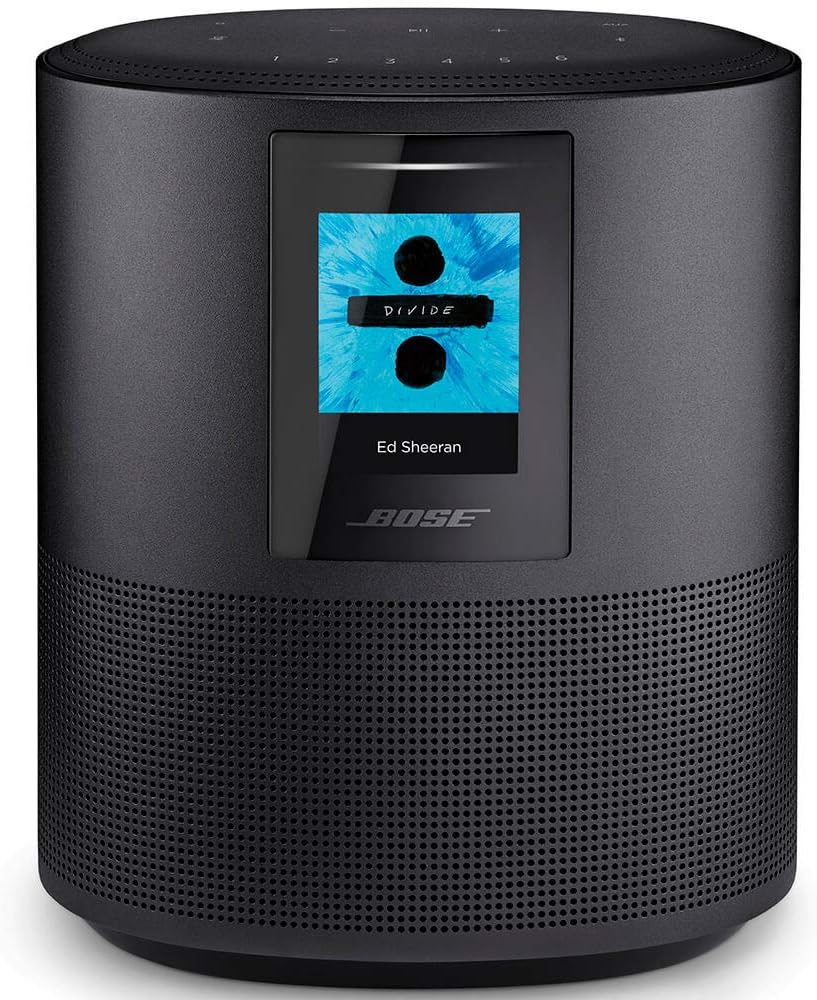
Designed to be both easy to use and fill a space with expansive stereo sound, the Bose Home Speaker 500 is the perfect smart speaker for you. Perfect for podcasts, playlists, and general background music, it’s designed to provide wall-to-wall stereo from a single, compact unit, resulting in a wider and more expansive soundstage than many single-speaker configurations.
With Alexa’s built-in voice control, you can manage the volume, skip tracks, and play/pause music without ever taking your hand off your phone. Improved stability and playback quality are further benefits of its Wi-Fi streaming capabilities, which include popular services like Amazon Music and Spotify. With Bluetooth, you may easily play music from your mobile device when you want to listen on the go.
Its excellent hearing is one of its most useful features. With the eight-microphone array’s emphasis on robust speech pickup, your orders will have a better chance of being understood regardless of background noise or distance.
Make it work with your schedule by adjusting the controls. Voice commands allow you to operate the device without using your hands, while the top controls allow you to make quick modifications. If you want more control over the settings and playback, you may open the Bose Music app.The Home Speaker 500 is an excellent choice for anyone looking for a large-sounding, dependable, and easy-to-use smart speaker.
3. Bose Portable Smart Speaker

The Bose Portable Smart Speaker is designed to cover all your bases, whether you’re listening at home, having an outdoor party, or just want a single speaker that you can operate with your hands-free method. The three-in-one design allows you to enjoy consistent sound and control no matter where you are listening by serving as a smart speaker for your home, a Bluetooth speaker for your travels, and a speaker that can be operated by voice commands.
With 360° audio, the sound is aimed to fill the room uniformly. That makes the music seem less “pointed” and more expansive throughout the room, yet the bass remains powerful thanks to Bose’s signature style. Whether you’re listening to radio, podcasts, or playlists, the speaker is designed to enhance the sound without muddying the vocals.
You can easily transport it from the kitchen to the bedroom without disturbing your current arrangement because it is lightweight and compact. Take it with you on outdoor adventures or for those spontaneous outings when you’d like more robust audio than what a phone speaker can provide.
When you’re online and linked to Wi-Fi, you may command music services like Pandora, Amazon Music, and Spotify with the voice commands of Google Assistant or Amazon Alexa. And if Wi-Fi isn’t an option, you may still listen on your mobile device over Bluetooth. This speaker is perfect for you if you desire versatile listening, smart features, and immersive sound.
4. Sonos Era 100 Smart Speaker

The Sonos Era 100 is an excellent choice if you’re looking for a small smart speaker that packs a powerful punch and won’t take up too much space in your home. Its design allows it to produce precise, immersive sound that fills the entire room. The bigger midwoofer brings deeper bass for a fuller, more balanced sound, and the next-gen dual-tweeter acoustic design enhances stereo separation, making instruments and vocalists feel more separate instead of blurring together.
One major advantage of working with real-world locations is the flexibility of placement. You can enhance your sound without moving the entire room thanks to its compact footprint, which makes it easy to install on a bookshelf, kitchen counter, desk, or bedside.
Depending on how you hear, you’ll also have access to several audio playback options. Stable performance and easy control using the Sonos app allow you to stream from your favorite services over Wi-Fi. Just tap a button to pair your phone with the device, and you’re good to go for casual, fast listening. In addition, the Sonos Line-In Adapter allows you to connect a turntable or other device via an auxiliary connection, providing you with additional freedom compared to many compact smart speakers.
Everything is easily set up. Everything can be set up in a matter of minutes by just plugging in the power wire, connecting your mobile device to Wi-Fi, and utilizing the Sonos app. The Era 100 is an excellent pick if you’re looking for a small, portable speaker with crisp stereo sound, deep bass, and simple streaming capabilities.
5. JBL Authentics 200 Smart Home Speaker

If you’re looking for a smart home speaker that not only sounds great but also makes a bold fashion statement, go no further than the JBL Authentics 200. The 25 mm tweeters in the stereo arrangement bring out the finer details, while the 5-inch full-range woofer and 6-inch passive radiator provide deeper bass. The result is a well-balanced sound that is suitable for podcasts and playlists alike.
One of the main selling points is the design. The aluminum frame, leather-like enclosure, and JBL’s signature Quadrex grille give it a modern twist while drawing inspiration from the company’s vintage designs. When you want your speaker to look as nice as it sounds, it fits perfectly in kitchens, offices, and living areas.
With the built-in Wi-Fi, streaming becomes much more versatile. With popular alternatives including AirPlay, Chromecast built-in, Spotify Connect, and Alexa Multi-Room Music, you may play audio content and music in high quality without interruptions. When you want to listen to music or audiobooks without connecting any additional devices, Bluetooth is a fast and easy solution.
Whether you prefer using your voice, apps, or buttons, control is a breeze. The JBL One app provides even more personalization options, in addition to the on-speaker settings for volume, bass, and treble. Another option for hands-free controls is to utilize Alexa or Google Assistant. Additionally, if you’d want music playing in every area of the house, you may connect several Authentics speakers to a single playlist using the multi-room playback feature.
Things to Consider Before Buying a Smart Speaker:
Smart speakers offer convenience and voice control, but before you buy one you should evaluate audio quality, smart-home compatibility, privacy settings, microphone performance, app support, and long-term cost to ensure the device fits your routines and protects your data.
Voice Assistants
You should compare assistants directly: Alexa offers extensive third‑party smart‑home skills and device integrations, Google Assistant excels at conversational search and follow‑ups, and Siri ties tightly into iOS and HomeKit with HomePod mini leveraging Thread. If you use Android, Google Assistant often provides faster answers; if you live in an Apple ecosystem, Siri gives deeper app and device control.
Smart Home Integration
When integrating devices, prioritize protocols you already own: Zigbee and Z‑Wave provide reliable mesh networking, Thread offers low latency and local control, and Wi‑Fi gives broad device availability but higher power use. Philips Hue, ecobee, Ring, and Nest all show different compatibility-check each speaker’s supported platforms before buying to avoid requiring extra hubs.
Digging deeper, choose a speaker that reduces bridging: Echo 4th gen includes a Zigbee hub so your Hue bulbs connect directly, HomePod mini acts as a Thread border router for newer devices, and Sonos supports AirPlay 2 for Apple users plus Alexa/Google for voice. If you run Home Assistant or SmartThings, confirm local API support to keep automations fast and private. After
Sound Quality
You should inspect driver sizes, frequency response (bass below ~60 Hz matters for depth), RMS power and whether the speaker supports stereo pairing or room‑tuning like adaptive EQ; compact units under ~10W often lack low end, while larger smart speakers or paired units (30-60W combined) deliver fuller sound. Test with familiar tracks and check measured reviews (THD, frequency curves) to confirm real‑world performance.
Compatibility with Existing Devices
You must verify assistant and protocol support-Amazon Alexa, Google Assistant, or Apple HomeKit/AirPlay 2-and connectivity like Wi‑Fi, Bluetooth, Zigbee, Thread, or Matter; for example, some Echo models include a Zigbee hub for Philips Hue integration, while HomePod relies on AirPlay 2 for streaming. Confirm whether the speaker can act as a hub and which third‑party apps it integrates with.
Start by listing your current devices and noting their protocols: if you have Hue bulbs, decide whether you’ll pair via the Hue bridge or a speaker with Zigbee; if you use Nest thermostats, Google Assistant compatibility simplifies control. Favor speakers that support Matter for future interoperability, check whether automations run locally versus in the cloud (local is faster and more reliable), and test multiuser voice recognition if multiple household members will interact with the device.
Benefits of Smart Speakers
You can automate repetitive tasks (morning routines, thermostat schedules), access instant hands-free info, and control dozens of devices from brands like Philips Hue and Nest. For example, setting a single “Good Morning” routine can adjust lights, read news, and start a coffee maker-saving you multiple manual steps each day while improving accessibility and convenience.
Potential Drawbacks
You’ll face privacy trade-offs since devices routinely send wake-word audio to cloud servers for processing, and there have been instances (e.g., 2019 reports) of human review of voice snippets. Connectivity dependence, fragmented ecosystems, and occasional false activations can also disrupt reliability and increase long-term costs.
Digging deeper, data retention policies vary: some platforms let you review or delete recordings, while others retain anonymized transcripts for improvement. You should segment your IoT devices on a guest Wi‑Fi, disable voice purchasing, and use mute-buttons when privacy matters. Choosing devices with on-device processing for basic commands (for example, certain HomePod functions) reduces cloud exposure, and adopting Matter-compatible gear will lessen vendor lock-in over time.
Assess Your Needs
If you play music often, choose speakers with dedicated tweeters and woofers and support for AirPlay 2 or Spotify Connect; if voice automation is more important, prefer devices with robust assistant ecosystems and native Zigbee or Matter hubs for direct device control. You should also factor in placement: kitchens benefit from IPX4 splash resistance, while bedrooms may need lower-volume nighttime modes.
Connecting to Wi-Fi
Check whether your speaker requires a 2.4GHz or 5GHz network; many smart speakers and IoT devices prefer 2.4GHz for range while 5GHz gives higher throughput. Use WPA2 or WPA3 encryption and avoid captive portals or guest networks during setup. During installation open the vendor app, allow location/Bluetooth permissions, select the SSID and enter the password; if the connection fails, try a factory reset or temporarily disable MAC filtering on your router.
Integrating with Smart Devices
Verify compatibility lists and account linking early; Philips Hue Bridge supports up to 50 lights and 12 accessories, while some speakers like the Echo Plus include a built‑in Zigbee radio so your bulbs can pair without a bridge. Link your accounts for Nest, Ring or SmartThings in your speaker’s app and enable relevant skills/actions. If your devices use Z‑Wave or proprietary hubs, plan to keep those hubs on the same LAN for reliable voice control.
Plan your automations and grouping to avoid conflicting routines-use room groups (e.g., “Living Room” or “Downstairs”) and name devices consistently so your voice shortcuts work reliably. Prefer local integrations when available to reduce latency and maintain basic functions during cloud outages; for example, a Hue Bridge keeps lighting scenes local. Also schedule firmware updates, confirm API requirements for third‑party plugs, and test complex scenes (multi‑device wake‑up or thermostat setback) before you rely on them daily.
Summing up
From above, you should weigh voice assistant compatibility, privacy settings, audio quality, smart-home integrations, budget, and update policies to match your needs; assess microphone range and data controls, confirm ecosystem support for your devices, and choose a model that balances features with long-term security and convenience.
Leave a Reply