
Finding the best streaming devices shouldn’t be a chore. Are you tired of slow menus and blurry video on your old smart TV? You deserve a smooth experience with crisp 4K resolution. We’ve tested the top picks to help you fix your home setup today. Transform your living room into a cinematic powerhouse with these incredible gadgets. Let’s look at the winners for every budget.
Contents
- Top 5 Streaming Devices:
- 1. NVIDIA Shield Android TV Pro
- 2. Amazon Fire TV Cube
- 3. Google TV Streamer 4K
- 4. Amazon Fire TV Stick 4K
- 5. Roku Streaming Stick 4K
- Things to Consider Before Buying a Streaming Device:
- Smart TVs
- Streaming Sticks and Boxes
- Compatibility with Streaming Services
- Internet Connectivity Options
- Advantages of Streaming Devices
- Disadvantages of Streaming Devices
- Assessing Your Viewing Habits
- Evaluating Features and Specifications
- Summing up
Top 5 Streaming Devices:
1. NVIDIA Shield Android TV Pro

If you’re looking for a dependable streaming device that can enhance your living room’s picture and convenience, the Amazon Fire TV Cube is a fantastic choice. Content that is compatible with it will appear more vivid, with improved contrast and highlight detail, thanks to its 4K streaming capabilities and compatibility with Dolby Vision HDR. With a compatible soundbar or home theater system, Dolby Atmos and Dolby Digital Plus enhance the audio experience by adding depth and a surround-style immersion, making action scenes and conversation feel larger.
Another compelling argument in its favor is the reliability of its connections. Enjoy the most reliable wired streaming with Gigabit Ethernet, seamless wireless performance with dual-band Wi-Fi, and accessory connectivity with Bluetooth 5.0 for headphones, speakers, and more. Because of this, you may expect a more personalized experience and fewer buffering issues.
The purpose of the remote is to facilitate regular use. Nighttime viewing is made easier with motion-activated, backlit buttons, and your most frequently used functions can be quickly accessed via a customized menu button. Aside from being able to control your TV and other gadgets from a single location, voice control allows you to search and command without using your hands. Bluetooth and infrared control are also included.
Also, the built-in remote locator is great for quickly finding the remote in case it gets lost on the couch.The Fire TV Cube streamlines and simplifies your setup for great 4K streaming with powerful connectivity and better control.
2. Amazon Fire TV Cube

If you’re looking for a streaming device that seems genuinely quick and also simplifies the control of your entire TV setup, the Amazon Fire TV Cube is a great choice. You can spend less time waiting and more time viewing thanks to its lightning-fast octa-core processor, which powers Amazon’s fastest streaming media player. Apps start faster and navigation is smoother.
Built-in microphones and a speaker make it possible to manage compatible TVs, soundbars, and receivers with your voice alone, even while you’re across the room. Additionally, Alexa search is more intelligent than just viewing titles. When you have an idea of a movie you want to watch but can’t remember the title, you can search for it by actor, plot, genre, or even quotable lines.
You may connect all of your media players to the Cube. Your TV can function more like a central hub rather than a jumble of individual devices when you use compatible devices to seamlessly transition between streaming apps and other inputs such as a cable box, gaming console, or even a camera.
On networks that enable it, the improved stability and responsiveness of streaming media are made possible by its compatibility with Wi-Fi 6E. Support for Dolby Vision, HDR, and Dolby Atmos, in addition to cinematic 4K, ensure that the audio and visual quality remain exceptional. You may stream music, TV episodes, and movies from all the main platforms with access to a plethora of apps and services; however, some of these may demand a subscription.
3. Google TV Streamer 4K

The Google TV Streamer (4K) is an excellent choice if you’re looking for a streaming device that’s easy to use, speedy, and personalized to your tastes. It consolidates all of your streaming media into one convenient location, so you can spend less time flitting between applications and more time discovering great content. Everyone in your household may benefit from personalized recommendations based on their viewing habits and interests. This eliminates the need to scroll aimlessly and makes it easier to discover new series, movies, and YouTube material.
with, with services like Tubi and Pluto TV, you can watch over 800 channels for free, with live TV. No matter where you are—on your TV, in the app, or even searching Google—you can add anything you like to a watchlist and return to it at your leisure.
Picture quality is enhanced with support for up to 4K HDR with Dolby Vision, resulting in more realistic detail and richer contrast. Dolby Atmos compatibility, when coupled with appropriate speakers, can enhance the listening experience with a more immersive, 3D-style sound.
With more RAM and a quicker processor than the last generation, performance has also been improved, allowing for quicker app switching and easier navigation. The 32GB of storage allows you to install additional apps, and the combination of Ethernet and Wi-Fi ensures stable streaming. Searching and controlling playback are made easier with the voice control on the remote.
4. Amazon Fire TV Stick 4K
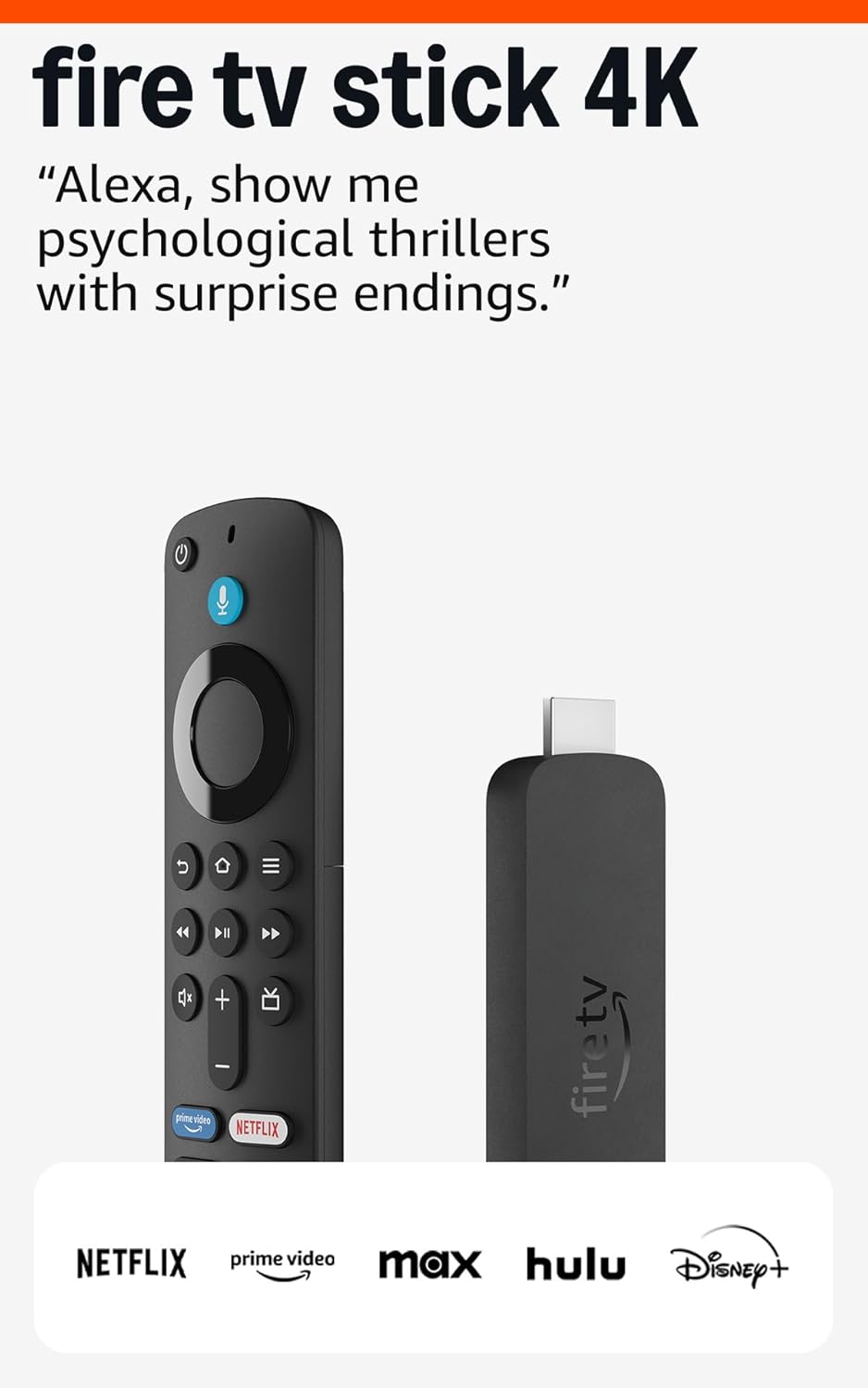
The Amazon Fire TV Stick 4K is an excellent choice if you’re looking for a portable streaming device that will provide the impression of smarter, faster, and more enjoyable operation of your 4K TV. Apps launch faster and streaming seems more responsive because to its design for smoother 4K performance. This is particularly noticeable when switching between services often.
The fact that it can do so much more than just play videos is one of its main selling points. Cloud gaming with Xbox Game Pass allows you to stream Xbox games, so you can play large titles without having a console. It’s great for casual gaming on the big screen without extra hardware.
Using Alexa, finding a show to watch is a breeze. You can save time when you know the mood you want but can’t recall the title by searching by actor, plot, genre, or even noteworthy quotations. Support for Wi-Fi 6 ensures uninterrupted streaming, even when other devices in your house are utilizing the same network.
With 4K Ultra HD and the ability to use Dolby Vision and HDR10+, you can enjoy a more dramatic viewing experience with better color and contrast. Enhanced immersion is achieved when using speakers or a soundbar that are compatible with Dolby Atmos.
Lots of alternatives for content. Fire TV Channels, Tubi, and Pluto TV are ad-supported apps that provide access to a large library of free movies and TV series, in addition to big streaming services like Netflix and Prime Video.
5. Roku Streaming Stick 4K

If you’re looking for a reliable streaming upgrade that doesn’t require a lengthy setup and delivers sharp 4K clarity, the Roku Streaming Stick 4K is a great pick.In places farther away from your router, such as bedrooms, the strength of your connection is more important. With the long-range Wi-Fi receiver, you can keep the stream steady, which means less buffering and smoother playback even on a busy home network. Because of its portability, the stick may be easily transferred from one TV to another, allowing you to enjoy Roku’s interface in different rooms.
For practical settings in the real world, the compact form is ideal. It is designed to not obstruct nearby HDMI ports, allowing you to keep other devices connected and seamlessly transition between streaming and gaming. There will be less unsightly cords in your setup thanks to its ability to tuck away under the TV.
With all of Roku’s main apps in one convenient location, you won’t have to waste time navigating the interface to choose a show to watch. You may also say goodbye to multi-remote hassle because a single control can turn on the TV, adjust the volume, and operate your Roku player. When you don’t feel like typing, you can use voice control to search and start playing faster.The Roku Streaming Stick 4K is a great addition to your routine if you value fluid 4K streaming, an uncluttered user interface, and easy control.
Things to Consider Before Buying a Streaming Device:
This concise guide helps you evaluate streaming devices so you can choose the model that best fits your viewing habits, budget, and existing devices. You’ll learn what to check – app compatibility, streaming quality, interface speed, remote and voice controls, smart-home integration, storage and updates, and network requirements – so you can make a confident, practical purchase.
Smart TVs
You get a one-piece solution with Smart TVs-Samsung, LG, and Sony ship millions annually with Tizen, webOS, or Google TV-so you avoid extra hardware; however your TV’s OS may stop receiving major updates after a few years, app availability can differ (some niche apps are missing), and hardware limits like absent Dolby Atmos passthrough can affect audio setups.
Streaming Sticks and Boxes
You’ll find sticks like the Fire TV Stick 4K Max or Chromecast with Google TV offering plug-and-play 4K HDR and voice remotes at low cost, while boxes such as Apple TV 4K or Nvidia Shield provide better processors, Ethernet, and advanced codecs; choose sticks for portability and boxes when you want long-term performance or home-theater features.
Sticks rely on the TV’s HDMI port and often use USB power, so wireless performance (Wi‑Fi 5 vs Wi‑Fi 6) and proximity to the router matter; boxes include Ethernet ports, expandable storage, and stronger GPUs-Apple TV 4K and Nvidia Shield handle Dolby Vision and Dolby Atmos reliably-so if you stream 4K60 content, game-stream, or run Plex servers, a box typically delivers lower latency, smoother UI, and more frequent firmware updates.
Compatibility with Streaming Services
You should verify native apps for Netflix, Prime Video, Disney+, Hulu, Max, and YouTube are present and up to date, since some services restrict 4K or Dolby Vision to certified devices. Check for DRM support (Widevine L1, PlayReady) and casting options like AirPlay or Chromecast. For example, Netflix 4K playback requires Widevine L1 plus device certification, and Apple TV tends to have the broadest native app compatibility if you rely on Apple services.
Internet Connectivity Options
You should pick a device with Gigabit Ethernet if you want rock-solid 4K streaming, otherwise ensure it supports Wi‑Fi 6 (802.11ax) or at minimum Wi‑Fi 5 (802.11ac) with dual-band 2.4/5 GHz to reduce interference. Plan bandwidth: roughly 5-8 Mbps for HD and about 25 Mbps for a single 4K stream. Bluetooth is useful for headphones and gamepad pairing, while wired connections cut jitter and buffering.
You should also consider home-network strategies: for multiple 4K streams, aim for 50-100 Mbps available bandwidth and use wired backhaul, MoCA, or powerline adapters to bypass congested Wi‑Fi. Mesh systems with dedicated backhaul and QoS help dense households, and Wi‑Fi 6 improves simultaneous-device performance via OFDMA and MU‑MIMO. If latency matters for cloud gaming or live broadcasts, prefer wired Ethernet and configure QoS or static IPs for consistent throughput.
Advantages of Streaming Devices
You gain access to thousands of apps and services, with many devices offering 4K HDR and Dolby Atmos playback; for example, Roku’s channel store and Fire TV’s Alexa integration let you stream Netflix, Prime, and niche apps. Entry hardware often costs under while higher-end units (Nvidia Shield, Apple TV 4K) provide better performance, Plex support, and faster updates-so you can tailor your setup to price, quality, and ecosystem preferences.
Disadvantages of Streaming Devices
You’ll face recurring subscription fees if you use multiple services, plus heavy data consumption-4K can use ~7 GB/hour-so broadband and data caps matter. Platform fragmentation means an app you need might not exist on your chosen device, and some manufacturers place ads or promoted content in the UI, which can degrade your viewing experience.
Further, you should watch for compatibility and longevity issues: DRM and codec support (HEVC, VP9) vary, so purchased or rented content may fail on cheaper players. Manufacturers can stop updating older units, forcing you to replace hardware, and privacy policies differ-check what viewing data each platform collects before committing.
Assessing Your Viewing Habits
If you stream more than 10 hours per week, prioritize a device with a fast processor and 4K/HDR decoding; Netflix and Apple TV often require Dolby Vision for the best picture. If live sports dominate your watching, choose low-latency playback and a reliable Wi‑Fi 6 connection. When gaming or using cloud gaming, look for devices advertising sub-20 ms input lag and HDMI 2.1 support to handle 4K at higher frame rates.
Evaluating Features and Specifications
When you evaluate specs, prioritize 4K@60Hz minimum if you watch UHD, confirm Dolby Vision and Atmos support for better picture/sound, ensure AV1 or HEVC support for efficient streaming, and check whether the device has Wi‑Fi 6 or gigabit Ethernet for consistent 4K playback.
Also consider use case: if you game, prioritize HDMI 2.1 and low input lag; if you stream mostly movies, give weight to HDR formats and bit‑perfect passthrough for soundbars; aim for devices with at least 2GB RAM and 8GB storage to avoid stutters, and use wired connections or 5GHz/6GHz bands for stable throughput when streaming high‑bitrate 4K content.
Summing up
Taking this into account, weigh device compatibility, streaming service support, resolution and HDR needs, interface and remote usability, app ecosystem, connectivity and network performance, privacy and software update policy, and budget. Choose a device that fits your viewing habits and tech setup so you get smooth playback, easy navigation, and long-term reliability.
Leave a Reply